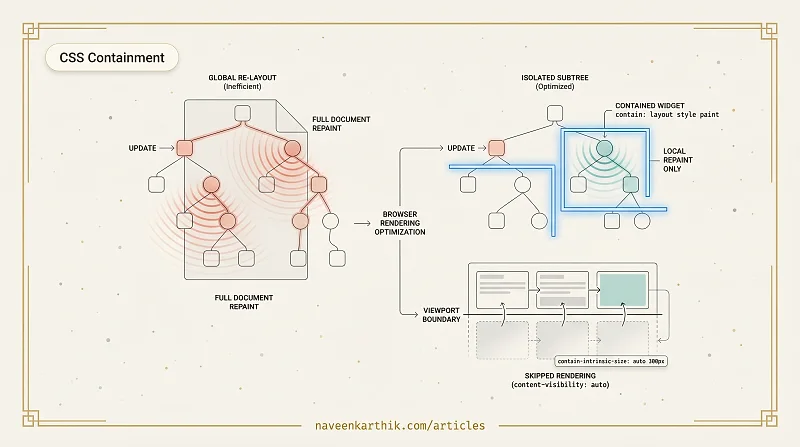
The browser doesn't know which parts of your page have changed unless you tell it. By default, a style change anywhere can theoretically affect everything — change a single element's width, and the browser may recalculate the layout of every element after it.
Think of it like rooms in a house: normally, if you rearrange furniture in one room, the browser checks whether it affected all the other rooms too. CSS Containment is like putting up walls — you tell the browser "whatever happens inside this room stays in this room." The browser can then skip checking the rest of the house entirely.
What CSS Containment Does
The contain property declares that a subtree is independent from the rest of the document in specific ways. The browser uses this to optimize layout, style, and paint work.
There are four containment types:
layout — the element's children cannot affect the layout of elements outside it, and vice versa. The browser can skip re-laying out the rest of the document when this subtree changes.
style — style changes inside the element (like counters) cannot affect elements outside it.
paint — the element acts as a stacking context; its children won't be painted outside its border box. The browser can skip painting this element when it's outside the viewport.
size — the element's size is fixed and doesn't depend on its children. This enables the most aggressive optimizations but requires you to set an explicit size.
strict is shorthand for layout style paint size. content is shorthand for layout style paint (size excluded).
content-visibility: auto
content-visibility: auto is the highest-impact single property in this article. It tells the browser to skip layout and paint for elements that are off-screen.
On a page with dozens of off-screen cards, the browser renders only the visible portion. This can reduce initial rendering time by 5–10× on content-heavy pages.
contain-intrinsic-size is required alongside it. When an element is skipped, the browser needs a placeholder size to calculate scrollbar height correctly. Without it, the scrollbar jumps erratically as elements render on scroll.
The auto keyword means: "use the last-known rendered size of this element, and fall back to the provided value (320px) on the very first render." Without auto, the element always uses the fixed placeholder — even after it's been rendered at a different size. Always prefer auto <estimate> over a bare <size> so the placeholder improves as the browser learns the real dimensions.
content-visibility: hidden — Preserve State, Skip Rendering
There's also content-visibility: hidden, which behaves like content-visibility: auto for an always-off-screen element. Unlike display: none, it doesn't destroy the element's layout state — the browser skips rendering the subtree entirely but remembers its size and scroll position. This is ideal for single-page apps with hidden tabs or sections that you switch between frequently:
When to Use Each
| Scenario | Recommended |
|---|---|
| Complex widget (calendar, chart) with frequent internal updates | contain: layout style paint |
| Long feed of cards or articles | content-visibility: auto |
| Fixed-size third-party embed | contain: strict |
| Anything animating independently | contain: layout |
Real-World Impact
A news site with 100 article cards below the fold can spend most of its initial rendering budget on off-screen content. Adding content-visibility: auto makes those cards nearly free until the user scrolls to them. The CSS Containment spec cites rendering time improvements of up to 7× on content-heavy pages.
The property is supported in all modern browsers (Chrome 85+, Firefox 125+, Safari 18+).
Caveats
content-visibility: autoelements are excluded from the browser's find-in-page (Ctrl+F) results until rendered. For content-heavy pages this is usually an acceptable tradeoff — users searching for text on a page they haven't scrolled to yet is rare.- Screen readers may not announce content inside unrendered
content-visibility: autoelements. Test with assistive technology if your page relies on screen-reader navigation. - Elements with
content-visibility: autodon't respond to Intersection Observer callbacks until rendered. - Setting
contain: sizewithout a fixed size causes the element to collapse to zero, so always pair it with explicit dimensions.
Browser support and graceful degradation: content-visibility and contain are supported in Chrome 85+, Firefox 125+, Safari 18+. In older browsers, both properties are silently ignored — the page still works, just without the performance optimization. There's no downside to adding them today.
Measuring the Impact
Open DevTools → Performance panel, record a page load, and look at the Layout and Paint events in the main thread row. With content-visibility: auto applied to off-screen sections, you should see significantly fewer layout/paint events (each event represents one rendered element). Lighthouse's "Avoid large layout shifts" and "Avoid excessive DOM size" audits also reflect containment improvements indirectly.
CSS Containment is one of those features that's easy to overlook because it doesn't change how anything looks — it only changes what the browser bothers to compute. On a page with a lot of independent sections or a long content feed, adding a few lines of contain and content-visibility is often the highest-ROI performance change you can make without touching any JavaScript.