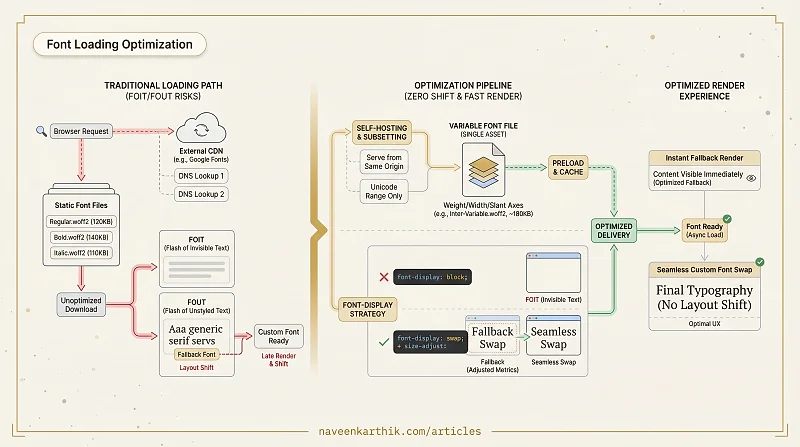
Custom fonts are a performance landmine hiding behind good design. They can cause invisible text for seconds (FOIT), or pop in late and shift your layout (FOUT), or add two extra DNS lookups to your critical path just to load a typeface from Google's CDN. None of this is inevitable — each problem has a specific fix.
How Fonts Load
When the browser encounters a CSS @font-face rule, it doesn't immediately download the font. It waits until an element on the page actually uses that font face. At that point, it must download the file before it can render the text.
While the font is downloading, the browser has a decision to make: show nothing (FOIT — Flash of Invisible Text), or show the text in a fallback font and swap it in when the custom font arrives (FOUT — Flash of Unstyled Text).
font-display
The font-display descriptor controls this behavior:
| Value | Block period | Swap period | Best for |
|---|---|---|---|
auto | Browser default | Browser default | — |
block | ~3s | infinite | Icon fonts |
swap | ~0ms | infinite | Body text |
fallback | ~100ms | ~3s | Most use cases |
optional | ~100ms | none | Non-critical fonts |
swap shows fallback text immediately, then swaps in the custom font when ready. This prevents invisible text but can cause layout shift if the fallback and custom font have different metrics. You can minimize this shift with size-adjust:
Use Font Style Matcher to find the right override values for your font pair.
optional is the most performance-friendly: if the font isn't cached and can't load within a short window, the browser abandons it for this page load. Use it for decorative fonts.
Self-Hosting vs Google Fonts
Google Fonts requires a DNS lookup and connection to fonts.googleapis.com and fonts.gstatic.com — two extra round trips before the font can start downloading. You can eliminate both by self-hosting.
Download the font files (use the google-webfonts-helper tool to get WOFF2 files), host them on your own server, and reference them directly.
WOFF2 is the only format you need. All modern browsers support it and it offers ~30% better compression than WOFF.
Subsetting
A full font file for a Latin typeface may include characters for dozens of scripts you don't need. Subsetting removes unused glyphs and reduces the file size significantly.
Use unicode-range to load only the character ranges your page uses:
Tools like pyftsubset or the online fonttools can create subset files. Google Fonts already does this automatically when you use their service.
Preloading Critical Fonts
If a font is used above the fold, preload it in the <head> so the browser discovers it before it parses the stylesheet:
The crossorigin attribute is required even for same-origin fonts — the browser uses CORS for font requests. Omitting it causes the browser to fetch the font twice.
Preload only the font weights actually used above the fold. Preloading 5 font variants defeats the purpose — you're just blocking more resources upfront.
Variable Fonts
Variable fonts encode the entire design space of a typeface (weight, width, slant) in a single file. Instead of loading separate files for Regular, Bold, Italic, and Bold Italic, you load one file.
For designs using more than 2–3 weights, a variable font is almost always smaller than the sum of the individual files. However, a variable font file is typically larger than a single static weight — if your design uses only one or two weights, individual static files may be smaller. Profile both approaches to know for sure.
The CSS Font Loading API (document.fonts) lets you programmatically detect when fonts are ready:
Font performance is one of those areas where doing the right thing once — self-host, subset, preload, use a variable font — pays dividends on every page load forever. The biggest trap is using Google Fonts "just for now" and never getting back to it.