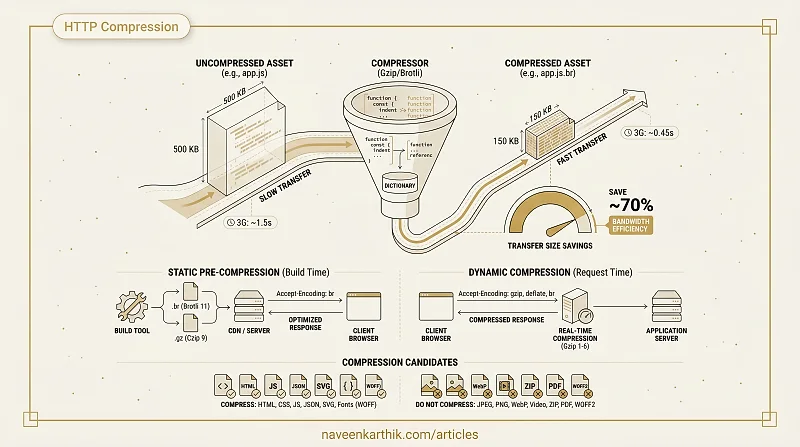
If your server isn't compressing text responses, you're sending 60–75% more bytes than necessary on every uncached load. A 500KB JS bundle that compresses to 150KB saves 350KB of bandwidth — which on a 3G connection is the difference between a usable app and one that times out. This is one of the lowest-effort wins in web performance.
How Compression Works
Both Gzip and Brotli use variations of the LZ77 algorithm combined with Huffman coding. The compressor builds a dictionary of repeated byte sequences and replaces subsequent occurrences with references to earlier positions. Longer files with more repetition compress more aggressively.
JavaScript compresses particularly well because of repeated keywords (function, return, const), consistent indentation, and variable name patterns.
Gzip vs Brotli
| Gzip | Brotli | |
|---|---|---|
| Introduced | 1992 | 2015 (Google) |
| Browser support | Universal | All modern browsers |
| Typical JS savings | 60–70% | 65–75% |
| Compression speed | Fast | Slower at max levels |
| Content-Encoding header | gzip | br |
Brotli consistently achieves 15–25% better compression than Gzip at equivalent quality settings. Both use numeric quality levels: Gzip 1–9, Brotli 0–11. Higher levels = smaller files but slower compression. Decompression speed is comparable regardless of level, so the client pays no meaningful penalty. For pre-compression at build time, always use Brotli level 11 — compression speed doesn't matter at build time, only the output size does.
The browser signals what it accepts via the Accept-Encoding request header:
The server responds with the compressed version and sets the Content-Encoding header accordingly:
Static vs Dynamic Compression
Dynamic compression compresses files on each request. It works for any response but adds CPU overhead per request. Use it only at lower compression levels (Gzip 1–6) to keep latency reasonable.
Static (pre-compression) generates compressed files at build time and serves them directly. This is the correct approach for production. You can use Brotli at level 11 (maximum) with no request-time cost because the heavy computation was done once at build.
Most build tools support this:
Server Configuration
Nginx — serve pre-compressed files:
Apache — static compression with mod_deflate or mod_brotli.
Node/Express — use the compression middleware for dynamic compression or configure your CDN to handle it.
Most CDNs (Cloudflare, Vercel, Netlify, AWS CloudFront) automatically apply Brotli compression. If you're on a CDN, verify it's enabled — it often is but not always at the Brotli level.
What to Compress (and What Not To)
Compress: HTML, CSS, JavaScript, JSON, XML, SVG, plain text, web fonts (WOFF — note: WOFF2 is already compressed internally).
Don't compress: JPEG, PNG, WebP, AVIF, GIF, MP4, ZIP, WASM, PDF. These formats have built-in compression. For example, WOFF2 uses Brotli internally — compressing it again at the server level adds CPU cost for virtually zero additional savings and may even increase the file size. As a rule of thumb: if the format already does its own compression, the server shouldn't try to compress it again.
Why this matters for metrics: Compression directly reduces transfer time (fewer bytes over the wire), which improves TTFB for those resources and FCP/LCP for anything on the critical path. A 500KB JS bundle compressed to 150KB downloads in roughly one-third the time — and on slow connections, that can be the difference between passing or failing Core Web Vitals thresholds.
Checking Compression in DevTools
Open DevTools → Network tab. Click any text resource. In the Headers tab, look for Content-Encoding: br or Content-Encoding: gzip. The Size column shows two numbers: transferred size / resource size. If they differ significantly, compression is working.
If those two numbers match, compression is off for that resource.
Compression is infrastructure, not code — set it up once and it silently helps every asset on every load. The only real decision is whether you're pre-compressing at build time (you should be) or relying on your CDN (verify it, don't assume). Brotli at maximum level on pre-built assets is the goal; Gzip is just the fallback you keep around for older proxies.