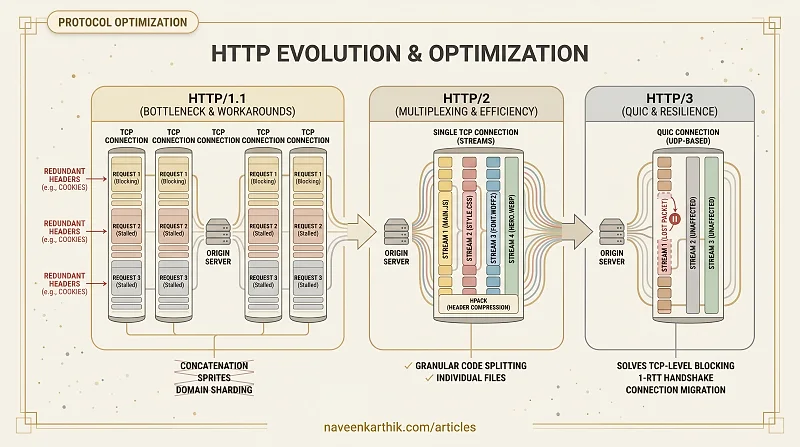
HTTP/1.1 dominated the web for two decades largely because it worked well enough, and the workarounds developers invented — concatenation, sprites, domain sharding — papered over its limitations. HTTP/2 and HTTP/3 solve those limitations at the protocol level, which makes some of those workarounds not just unnecessary but actively counterproductive.
The HTTP/1.1 Bottleneck
HTTP/1.1 uses one request-response pair per TCP connection. To load multiple resources in parallel, browsers open multiple connections — typically 6 per origin.
This creates several problems:
Head-of-line blocking: Within a single connection, responses must be received in the order they were requested. A slow response blocks all subsequent responses on that connection.
Connection overhead: Opening a new TCP connection costs a full round trip (plus TLS). With 6 connections per origin, that's up to 6 × (TCP RTT + TLS RTT) of overhead.
Header overhead: HTTP/1.1 headers are sent as plain text with every request. A single cookie-heavy request can have kilobytes of redundant header data.
These limitations drove a set of HTTP/1.1-era optimisations: concatenating CSS and JS files, CSS sprites, domain sharding (splitting resources across multiple domains to bypass the 6-connection limit), and inlining resources.
HTTP/2: Multiplexing and More
HTTP/2 was standardised in 2015 and addresses all three HTTP/1.1 bottlenecks.
Multiplexing
HTTP/2 uses a single TCP connection per origin but sends multiple requests and responses simultaneously over streams. Each resource gets its own stream, and streams are interleaved over the same connection.
This eliminates head-of-line blocking at the HTTP layer. A slow response no longer blocks other resources — they flow in parallel on the same connection.
Header Compression (HPACK)
HTTP/2 uses HPACK compression for headers. Common headers (like Content-Type, Cookie, Host) are stored in a shared lookup table and referenced by index rather than retransmitted verbatim. A 2KB cookie header on every request becomes a few bytes.
Note: HTTP/3 replaces HPACK with QPACK, which solves a subtle HPACK limitation — HPACK's shared dictionary must stay in sync between client and server, which means a lost TCP packet can stall header decompression (another form of head-of-line blocking). QPACK avoids this by allowing the dictionary to update asynchronously.
Stream Prioritisation
HTTP/2 allows the browser to assign priorities to streams, so critical resources (HTML, CSS, LCP image) can be served before lower-priority ones (below-fold images, analytics).
Server Push (and Why It Didn't Work)
HTTP/2 included a Server Push feature — the server could proactively send resources it predicted the client would need. In practice, it was complex to implement correctly, caused double-downloads when the resource was already cached, and has been effectively deprecated. Ignore it.
What Changes for Optimisation with HTTP/2
| HTTP/1.1 Optimisation | HTTP/2 |
|---|---|
| Concatenate JS/CSS files | No longer necessary — multiplexing handles parallel loading of many small files |
| CSS sprites | No longer necessary — individual icon files are fine |
| Domain sharding | Counterproductive — each origin needs its own TCP+TLS handshake, adding latency. With HTTP/2 multiplexing, one connection already handles unlimited parallel requests. Splitting across domains adds connection overhead without any parallelism benefit |
| Inlining small resources | Still useful for critical CSS, but less critical for small scripts/images |
With HTTP/2, many small files are often better than a few large ones — granular code splitting becomes more efficient.
HTTP/3 and QUIC
HTTP/3 replaces TCP with QUIC — a transport protocol built on UDP.
Why QUIC?
HTTP/2 still had one unsolved problem: TCP-level head-of-line blocking. Even though HTTP/2 multiplexes streams over one connection, TCP treats the connection as a single ordered byte stream. If a TCP packet is lost, all streams pause until the packet is retransmitted and received in order.
QUIC solves this by implementing streams at the transport layer. A lost QUIC packet only blocks the specific stream it belongs to; other streams continue uninterrupted.
QUIC Benefits
Reduced connection setup: QUIC combines the transport and TLS handshakes into a single round trip (1-RTT), with support for 0-RTT resumption for returning connections.
Connection migration: QUIC connections are identified by a connection ID rather than the source IP. If a user switches from Wi-Fi to mobile data, the QUIC connection survives — the IP changes but the connection ID stays the same. TCP would require a new connection.
Better performance on lossy networks: QUIC is especially beneficial on mobile networks where packet loss is higher.
HTTP/3 Adoption
HTTP/3 is supported by all major browsers and is used by Cloudflare, Google, and most major CDNs. If you're using a modern CDN, you're likely already serving HTTP/3 with no configuration required.
You can verify HTTP/3 is active in DevTools → Network → Protocol column (shows h3) or check the response headers:
What HTTP/3 Changes for Optimisation
HTTP/3 is mostly an infrastructure improvement — you don't write code for it. The implications:
- The case for concatenation is even weaker. Many small granular files over HTTP/3 perform well.
- Users on poor mobile connections (high packet loss) benefit disproportionately.
preconnectstill helps, but QUIC's 1-RTT handshake reduces the urgency.
The practical takeaway for most developers: stop bundling everything into one massive file out of HTTP/1.1 habit. Granular code splitting, individual icon SVGs, and separate font requests all work well on HTTP/2 and HTTP/3 — and give you better caching granularity as a bonus. The protocol improvements are real and they're already running on your CDN; take advantage of them by letting your build tool split your output more aggressively.