You wrote a lean, fast application. Then you added a live chat widget, analytics, a cookie banner, social share buttons, and a marketing tag manager. Third-party scripts are often the single largest source of main-thread blocking time on production websites — and they're code you don't control.
The Real Cost of Third-Party Scripts
A typical enterprise homepage loads 15–40 third-party scripts. Each one may:
- Add a DNS lookup and TCP connection (100–300ms each)
- Block the main thread during parse and execution
- Make its own additional network requests
- Inject inline CSS and manipulate the DOM
- Set up intervals and listeners that persist after load
Tag managers compound the problem by loading other scripts dynamically, making the total payload unpredictable.
Chrome UX Report data consistently shows that the largest contributor to poor TBT (Total Blocking Time) and INP scores is third-party JavaScript.
Measuring Third-Party Impact
In DevTools, the Network tab with the "Third-party" filter shows every request not to your own origin. The Performance tab → Bottom-Up → Group by Domain shows which domains consume the most main-thread time.
Lighthouse generates a "Reduce the impact of third-party code" audit that attributes blocking time and transfer size per domain.
To test the impact of removing a specific third, use Chrome's Request Blocking feature (DevTools → Network → Request Blocking) to block a domain and re-run Lighthouse. The delta in scores tells you exactly what that script is costing.
Loading Strategies
async and defer
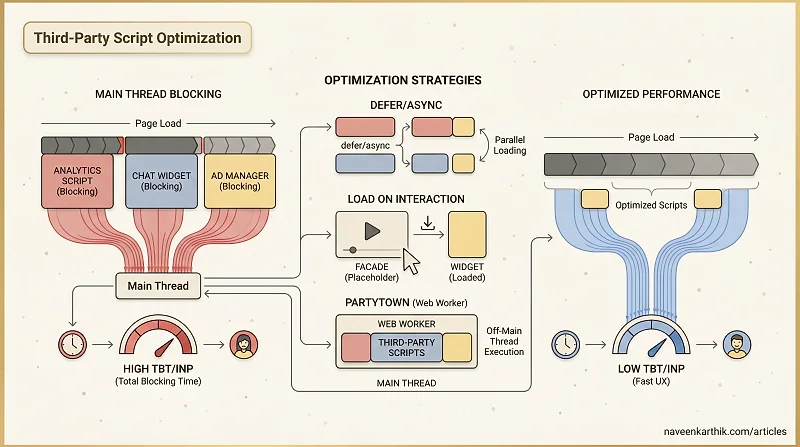
Always load third-party scripts with async or defer. Never load them as synchronous blocking scripts.
defer is usually preferable for third parties because it doesn't interrupt HTML parsing.
Load on Interaction
For widgets that most users never interact with (chat, video players, social embeds), defer loading entirely until the user signals intent.
This eliminates the script's cost entirely for the majority of users who never open the chat.
You can also trigger on hover or first scroll — anything that indicates the user is about to need it:
The Facade Pattern
A facade is a lightweight, static placeholder that looks like the real third-party widget. The actual script is loaded only when the user interacts with the facade.
The canonical example is a YouTube embed. A real YouTube <iframe> loads ~400KB of JavaScript immediately. A facade shows the video thumbnail and a play button, and loads the iframe only when clicked.
The lite-youtube-embed web component is a production-ready version of this pattern. Similar facades exist for Google Maps (maps-embed), Intercom, Zendesk, and most chat widgets.
Partytown
Partytown relocates third-party scripts to a Web Worker. Analytics, tag managers, and marketing scripts run off the main thread, communicating with the DOM via a synchronous proxy layer.
Setup requires copying the Partytown lib files to your public directory, then:
For Vite or Next.js, use the official @builder.io/partytown integration which handles the lib copying automatically. DOM reads are proxied synchronously back to the main thread; writes are batched. The main thread stays free.
Connection Warming
If you must load a third-party script on page load, at least warm the connection early so the DNS + TCP + TLS handshake is out of the way before the script is requested:
This can save 100–300ms on script load time without changing when the script executes.
The load-on-interaction pattern and the facade pattern together can eliminate the cost of third-party scripts for the majority of your users — the ones who load the page but never interact with the widget. That's usually 80%+ of your traffic.