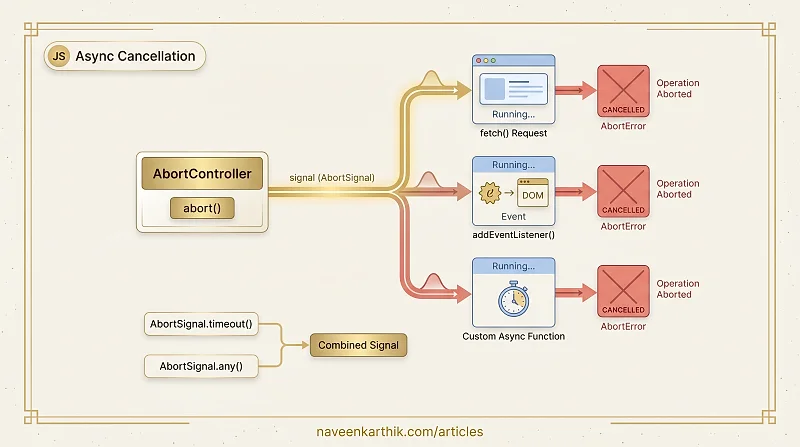
AbortController is the standard way to cancel ongoing async operations in JavaScript — fetch requests, event listeners, streams, and custom async work. It replaces patterns like manual cancellation tokens and timeout hacks.
Prerequisites: Async #3 — Promises
1. The Basic Pattern — Controller + Signal
AbortController creates a signal (an AbortSignal). You pass it to cancelable APIs and call controller.abort() when you want to cancel:
Loading editor...
2. Canceling fetch Requests
The most common use case — abort an in-flight network request:
Loading editor...
3. Wiring AbortSignal Into Custom Async Functions
Make your own async functions cancellable by checking signal.aborted and listening for the abort event:
Loading editor...
4. Removing Event Listeners with AbortSignal
Pass a signal to addEventListener and the listener is automatically removed when abort is called:
Loading editor...
5. Aborting Multiple Operations
One controller can cancel many things simultaneously:
Loading editor...
6. AbortSignal.timeout() — Static Convenience
Modern browsers support AbortSignal.timeout(ms) for simple timeout cases:
Loading editor...
7. Composing Signals — AbortSignal.any()
Combine multiple signals — abort if ANY of them fires:
Loading editor...
Key Takeaways
AbortController+AbortSignalis the standard cancellation pattern for the web.- Pass
signaltofetch(),addEventListener(), and custom async functions. - One controller can cancel multiple operations simultaneously.
AbortSignal.timeout(ms)creates a self-aborting signal — no manual timer needed.AbortSignal.any([s1, s2])aborts when ANY input signal aborts.- Always handle
AbortErrorspecially — it's an expected cancellation, not a real error.
Next: Data #3 — Map, Set, WeakMap, WeakSet Polyfills — implement these ES6 data structures and understand their use cases.