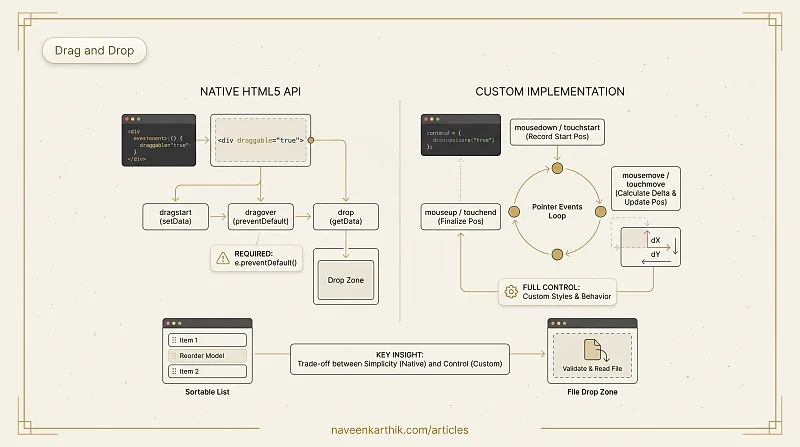
Drag and drop makes interfaces feel native — reorder lists, upload files, move cards on a board. There are two approaches: the native HTML5 Drag and Drop API, and custom implementations using pointer events. This article covers both.
Prerequisites: DOM Events #1 — Event Delegation & Bubbling
1. Native HTML5 Drag and Drop API
The native API uses draggable="true" and event handlers:
Loading editor...
2. Custom Drag — Using mousedown/mousemove/mouseup
The native API is limited (no custom drag previews, inconsistent across browsers). A custom implementation gives full control:
Loading editor...
3. Sortable List — Reorder Items with Drag and Drop
Loading editor...
4. File Drop Zone
Loading editor...
5. Accessibility Considerations
Loading editor...
Key Takeaways
- Native API:
draggable="true"+dragstart/dragover/dropevents. Simple but limited. - Custom drag:
mousedown/mousemove/mouseup+ touch events. Full control over appearance and behavior. e.preventDefault()is required ondragoverto allow drops.- Mobile: Use touch events (
touchstart/touchmove/touchend) with{ passive: false }. - For sortable lists: keep a data model, reorder on drop, re-render from the model.
- Always include keyboard alternatives for accessibility.
Next: Web APIs #4 — localStorage, Cookies, sessionStorage & IndexedDB — all four browser storage APIs compared and implemented.