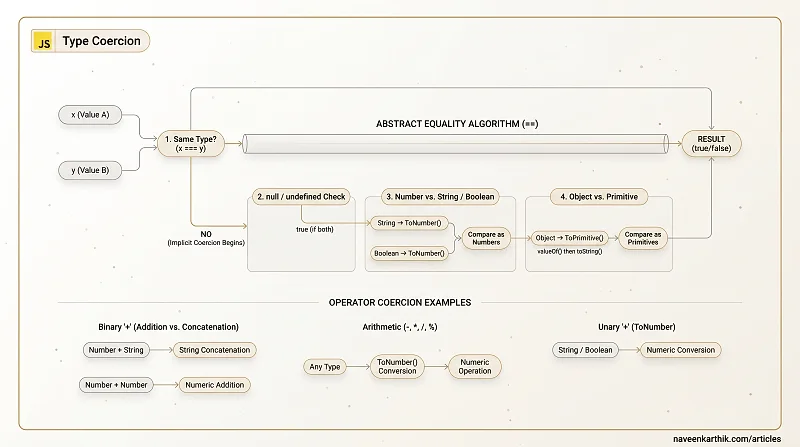
Type coercion is when JavaScript automatically converts a value from one type to another — like turning the number 1 into the string "1", or the other way around. This happens silently in many operations, and if you don't know the rules, the results look like nonsense: [] + {} becomes "[object Object]" and [] == ![] is true.
This article walks through the abstract equality algorithm, implicit vs explicit coercion, and every edge case worth knowing.
Prerequisites: JS Foundations #1 — Variables & Scope
1. == vs === — The Core Difference
=== (strict equality) checks both type and value — no coercion. == (abstract equality) coerces types first, then compares.
Loading editor...
Rule of thumb: always use === unless you specifically want coercion. There's no performance difference worth thinking about.
2. The Abstract Equality Algorithm (The Rules for ==)
When you write x == y, the engine follows these steps in order:
- Same type? → Use
=== - null == undefined? →
true - Number vs String? → Convert string to number, compare again
- Boolean vs anything? → Convert boolean to number, compare again
- Object vs primitive? → Convert object to primitive, compare again
- Otherwise →
false
Loading editor...
3. The Infamous [] == ![] — Step by Step
Loading editor...
Now you can reason through any coercion puzzle.
4. The + Operator — Addition or Concatenation?
The + operator is overloaded: if either operand is a string, it concatenates. Otherwise, it adds:
Loading editor...
The {} + [] gotcha: when {} appears at the start of a statement, the engine parses it as an empty code block, not an object. The result is +[] which coerces the empty array to 0:
Loading editor...
The key lesson: {} + [] at statement-level is 0, but inside parentheses or function arguments it's "[object Object]". This is a parsing ambiguity, not a coercion rule.
5. Other Arithmetic Operators — -, *, /, %
These operators always coerce to numbers:
Loading editor...
6. The Unary + and - Operators
Unary + coerces its operand to a number. Unary - does the same then negates:
Loading editor...
7. Comparison Operators — <, >, <=, >=
These operators also coerce types. If both operands are strings, they compare lexicographically (dictionary order). Otherwise, both are coerced to numbers:
Loading editor...
The "10" < "2" trap is a common bug when sorting arrays of strings that look like numbers.
8. Explicit Coercion — You're in Control
Implicit coercion is what happens automatically with ==, +, etc. Explicit coercion is when you deliberately convert a type using built-in functions:
Loading editor...
Prefer explicit coercion when you need a specific type. It's clearer and avoids surprises.
9. ToPrimitive — How Objects Become Primitives
When coercion needs a primitive from an object, the engine calls ToPrimitive:
- If hint is
"string"→ trytoString()thenvalueOf() - If hint is
"number"or"default"→ tryvalueOf()thentoString()
You can control this with Symbol.toPrimitive:
Loading editor...
10. Object.is() — Better Strict Equality
Object.is() is like === but with two corrections:
Loading editor...
11. Truthy and Falsy
The 6 falsy values: false, 0, "", null, undefined, NaN. Everything else is truthy — including [], {}, " ", and -1.
Loading editor...
Key Takeaways
===checks type AND value — no coercion.==coerces first.- The
==algorithm: same type → compare; null/undefined → true; string → number; boolean → number; object → primitive. +is overloaded — if either operand is a string, it concatenates.-,*,/,%always coerce to numbers.- Falsy values:
false,0,"",null,undefined,NaN. Everything else is truthy. Object.is()fixesNaNand+0/-0edge cases in===.
Next: JS Foundations #6 — Error Handling — try/catch/finally, custom error classes, and global error handlers.