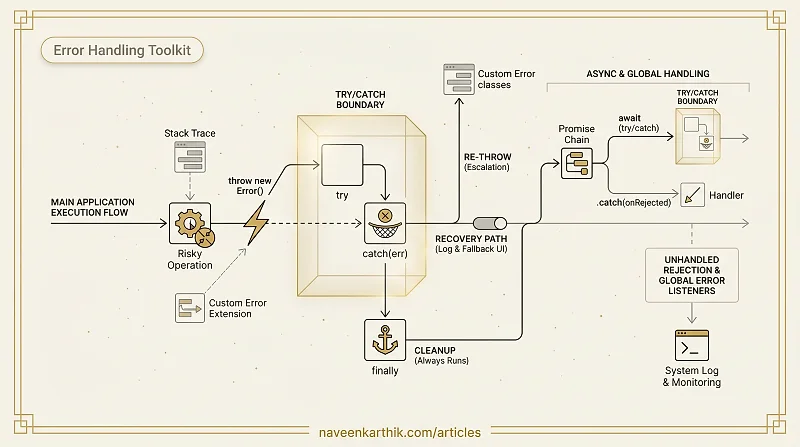
Error handling in JavaScript goes beyond try/catch. Without error handling, a single uncaught error crashes your entire program — the rest of your code never runs. Error handling lets you gracefully recover, show fallback UI, log what went wrong, and keep the app alive.
This article covers the full toolkit: try/catch/finally, custom error classes, re-throwing patterns, unhandled promise rejections, and global error listeners.
Prerequisites: JS Foundations #1 — Variables & Scope
1. throw — Starting an Error
Before we can catch errors, we need to know how to create one. The throw statement immediately stops the current function and starts unwinding the call stack until a catch block is found:
Loading editor...
If no catch exists anywhere up the stack, the program terminates (or the promise rejects unhandled). Always throw Error objects, never plain strings or numbers — Error objects include a stack trace showing exactly where the problem happened.
2. try/catch/finally — The Basics
The try block runs code that may throw. The catch block receives the error. The finally block runs regardless of whether an error occurred:
Loading editor...
The catch parameter is optional (ES2019) — you can omit it if you only need the finally:
Loading editor...
3. The Error Object
JavaScript has several built-in error types:
Loading editor...
Key properties of any Error object:
Loading editor...
4. Custom Error Classes
Extend Error to create domain-specific errors with extra data:
Loading editor...
Using instanceof to distinguish error types is cleaner than checking err.name or err.message.
5. finally Always Runs — Even After return
The finally block executes even if try has a return statement:
Loading editor...
Note: finally runs, but the return from try wins. If finally itself has a return, it overrides everything:
Loading editor...
6. Re-throwing Errors
Sometimes you catch an error to log it, then re-throw it so a higher-level handler can deal with it:
Loading editor...
This is the log-and-throw pattern — useful in layered architectures where the top-level code decides what to show the user.
7. Catching Async Errors
try/catch works with async/await — just wrap the await:
Loading editor...
Without await, you need .catch() — a rejected promise doesn't throw synchronously:
Loading editor...
8. Unhandled Promise Rejections
A rejected promise with no .catch() triggers the unhandledrejection event:
Loading editor...
Always add a .catch() or try/catch around your promises.
9. Global Error Handling
Catch errors that escape all try/catch blocks:
Loading editor...
10. Error Boundary Pattern
In complex apps, wrap parts of the app in "error boundaries" that catch errors and show a fallback UI:
Loading editor...
11. Throwing Non-Error Values
You can throw anything — but don't. Always throw Error objects so you get stack traces:
Loading editor...
Key Takeaways
try/catch/finally—finallyruns no matter what, even afterreturn.- Use
instanceofto distinguish custom error types — cleaner than checkingerr.name. async/awaiterrors work withtry/catch. Plain promises need.catch().- Always throw
Errorobjects (or subclasses), never strings or numbers. - Set up global error listeners for logging, not recovery.
- Handle promise rejections — unhandled ones crash Node.js and pollute browser consoles.
Next: Error Handling #2 — AggregateError, Error-First Callbacks & Promise Errors — AggregateError for Promise.any, error-first callbacks, custom error hierarchies, and Error.cause chaining.