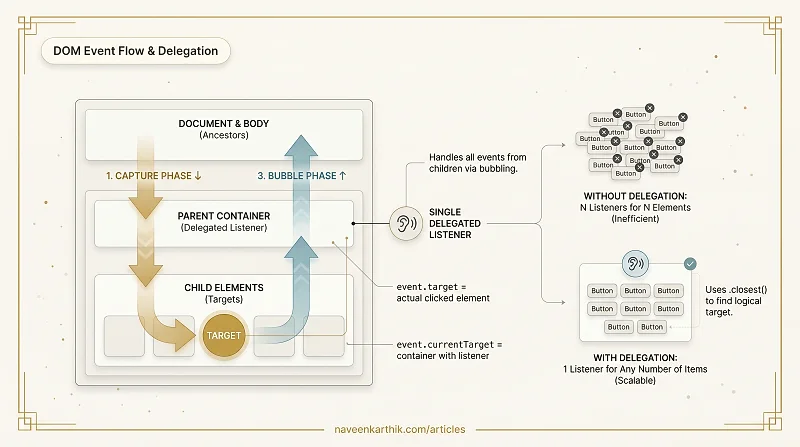
DOM events flow through three phases — capture, target, bubble — before they reach their destination. Event delegation is the technique of putting a single listener on a parent to handle events from all its children (present and future). Instead of 1000 listeners on 1000 buttons, you have 1 listener on the container.
Why this works: Events bubble up. A click on a nested <button> eventually reaches its parent <div> — the parent can check event.target to figure out which child was clicked. This article covers the full event flow and the delegation pattern.
1. The Three Phases — Capture, Target, Bubble
When you click a nested element, the event travels down (capture), reaches the target, then travels back up (bubble):
Loading editor...
2. stopPropagation vs stopImmediatePropagation
Loading editor...
3. The Problem Without Delegation — N Listeners for N Elements
Attaching individual listeners to every item doesn't scale:
Loading editor...
4. Event Delegation — The Pattern
Attach ONE listener to a parent. Use event.target to determine which child was clicked:
Loading editor...
5. matches() and closest() — The Two Key Methods
Loading editor...
6. Event Delegation with Dynamic Content
Delegation handles elements added AFTER the listener was created — no re-binding needed:
Loading editor...
7. Event Propagation Diagram
Loading editor...
Key Takeaways
- Events flow: capture (down) → target → bubble (up). Listeners default to bubble phase.
- Event delegation: one listener on a parent handles all children via
event.target. - Use
event.target.closest(selector)to find the nearest matching element from the click target. - Delegation works with dynamically added elements — no re-binding needed.
stopPropagation()stops the event traveling further up/down (but same-element handlers still fire).stopImmediatePropagation()stops everything on the current element + ancestors.
Next: DOM Events #2 — Drag & Drop — native drag and drop API and custom implementations.