JavaScript is single-threaded — one call stack, one thing at a time. Yet it handles thousands of concurrent operations without breaking a sweat. The secret is the event loop.
Think of JavaScript as a chef in a small kitchen:
- The Call Stack is the one dish the chef is actively cooking right now.
- Macrotasks (setTimeout, I/O) are order tickets lined up on the counter. The chef picks up one ticket at a time.
- Microtasks (Promises, queueMicrotask) are urgent garnish requests — the chef finishes ALL garnishes before grabbing the next order ticket.
This explains why setTimeout(fn, 0) doesn't run immediately (it's a new ticket) and why Promises jump the queue (they're garnishes on the current dish).
Prerequisites: JS Foundations #3 — Closures
1. The Call Stack — JavaScript's To-Do List
The call stack tracks where we are in a program. Functions push onto it when called, pop off when they return:
Loading editor...
A long-running function blocks everything — rendering, clicks, timers:
Loading editor...
2. The Event Loop — How Async Work Actually Happens
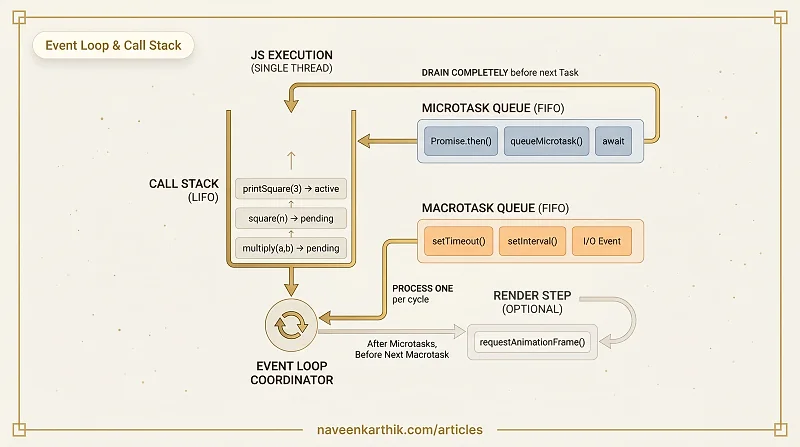
The event loop continuously checks: "Is the call stack empty? If so, push the next queued task." The magic is in the queues:
Loading editor...
The mental model:
Call Stack (LIFO)        Microtask Queue (FIFO)     Macrotask Queue (FIFO)
┌──────────┐             ┌──────────────────┐      ┌──────────────────────┐
│  script  │             │ Promise.then     │      │ setTimeout callback  │
│  (sync)  │             │ queueMicrotask   │      │ setInterval callback │
│          │             │ MutationObserver │      │ I/O events           │
│          │             │ await (after)    │      │ UI events            │
└──────────┘             └──────────────────┘      └──────────────────────┘
Event loop algorithm:
- Execute one task from the macrotask queue
- Drain ALL microtasks (including microtasks added by microtasks)
- Render (if needed — ~16ms frame budget)
- Go to step 1
3. Microtask Queue — Promises, queueMicrotask, await
Microtasks run after every task, before the next task. All microtasks drain before any macrotask runs:
Loading editor...
queueMicrotask() explicitly schedules a microtask:
Loading editor...
4. Microtask Starvation — The Infinite Loop Trap
Scheduling a microtask that schedules another microtask starves the macrotask queue — rendering and user input freeze:
Loading editor...
5. Complete Task Ordering — Everything in Sequence
Loading editor...
6. The Render Step — Where rAF Fits
Between macrotasks, after microtasks drain, the browser may render a frame. requestAnimationFrame callbacks fire just before the render:
Loading editor...
7. Visualizing the Event Loop
Loading editor...
Key Takeaways
| Queue | Examples | Priority |
|---|---|---|
| Call Stack | Synchronous code | Runs immediately |
| Microtask | Promise.then, queueMicrotask, await | Drains after every task |
| Macrotask | setTimeout, setInterval, I/O, events | One per event-loop tick |
| rAF | requestAnimationFrame | Before render step |
- JavaScript is single-threaded — one call stack, one thing at a time.
- Microtasks drain completely before the next macrotask — this includes microtasks added by microtasks.
setTimeout(fn, 0)does NOT run immediately — it's a macrotask waiting behind the current task + all microtasks.- Microtask starvation happens when a microtask schedules another microtask infinitely — the macrotask queue and rendering freeze.
Next: Async #2 — setTimeout & setInterval Deep Dive — timers, drift, nested scheduling, and the minimum delay.