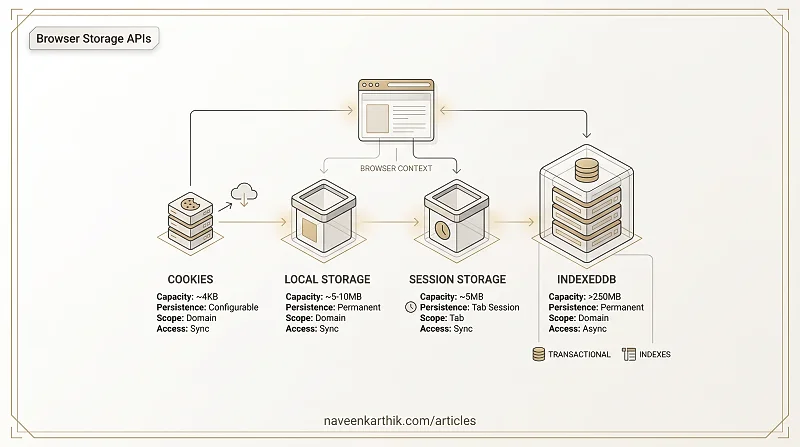
Browsers offer four storage APIs, each with different capacity, persistence, and access patterns. This article compares all four and implements utilities for each: a TTL wrapper for localStorage, a cookie helper, and a basic IndexedDB CRUD store.
1. The Four Storage APIs Compared
Loading editor...
2. localStorage Wrapper with TTL Expiry
Plain localStorage values never expire. Add TTL support:
Loading editor...
3. Cookie Utilities — get, set, delete
Loading editor...
4. IndexedDB — Basic CRUD Store
IndexedDB is callback-based but can be promisified:
Loading editor...
5. When to Use Which Storage
Loading editor...
Key Takeaways
- Cookies (~4KB): auto-sent with HTTP requests. Use HttpOnly + Secure for auth tokens.
- localStorage (~5-10MB): simple sync key-value. Use TTL wrappers for expiration.
- sessionStorage (~5MB): same API as localStorage but cleared on tab close.
- IndexedDB (>250MB): async, transactional, indexed — a real database in the browser.
- Never store sensitive data in localStorage/sessionStorage (XSS vulnerable). Use HttpOnly cookies for auth tokens.
- IndexedDB operations are transactional — all reads/writes happen within a transaction.
That concludes the JavaScript Deep Dive series — 58 articles from variables and scope through the event loop, async patterns, engine internals, data structures, and browser APIs.