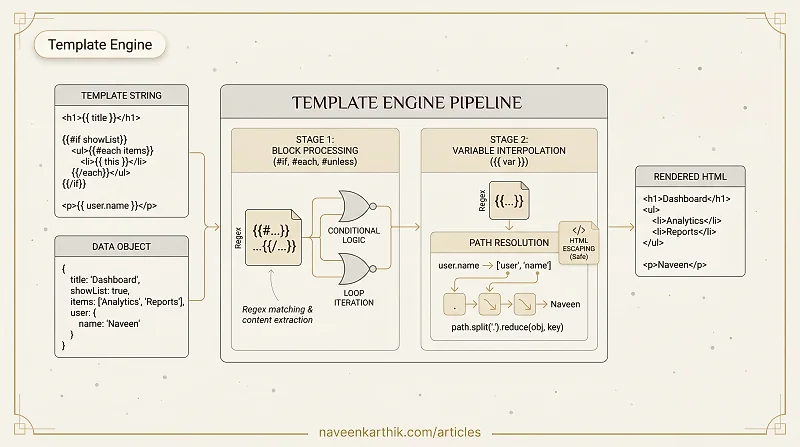
Template engines replace placeholders with data — Handlebars, Mustache, even React's JSX compiles to something similar. This article builds a minimal template engine that handles variable interpolation, loops, and conditionals using regex.
Prerequisites: JS Foundations #8 — Template Literals
1. Simple Variable Replacement — {{ var }}
Loading editor...
2. Conditionals — {{#if}} and {{/if}}
Loading editor...
3. Loops — {{#each}} and {{/each}}
Loading editor...
4. Full Engine — if, unless, each, and variables
Combining everything into one function:
Loading editor...
5. Escaping — Preventing HTML Injection
Always escape user-supplied data in templates:
Loading editor...
Key Takeaways
- Regex
\{\{\s*([\w.]+)\s*\}\}matches template variables with optional dot notation. - Block helpers (
#each,#if,#unless) need regex that handles nested content (basic[\s\S]*?). - Dot-notation path resolution: split by
., reduce over the data object. - Always escape user data in templates with
{{{ }}}reserved for trusted HTML. - This pattern scales to handlebars/mustache/liquid — the regex engine just gets more sophisticated.
Next: V8 #1 — JIT Compilation & Hidden Classes — how V8's Ignition and TurboFan make JavaScript fast.