Template literals are more than string interpolation — they support multiline strings without escape characters, nested expressions, and tagged templates that let you process template strings with a function. This article covers all three capabilities with runnable examples.
Prerequisites: JS Foundations #1 — Variables & Scope
1. Basic Template Literals — Interpolation
Template literals use backticks (`) instead of quotes. Expressions inside ${ } are evaluated and inserted:
Loading editor...
Any expression works inside ${} — function calls, ternary operators, math, even nested template literals:
Loading editor...
2. Multiline Strings
Template literals preserve newlines — no more \n or string concatenation for multiline content:
Loading editor...
Be mindful of indentation — whitespace inside the backticks is preserved:
Loading editor...
3. Nesting Template Literals
You can nest template literals inside ${} — useful for conditional rendering:
Loading editor...
4. Tagged Templates — Processing with a Function
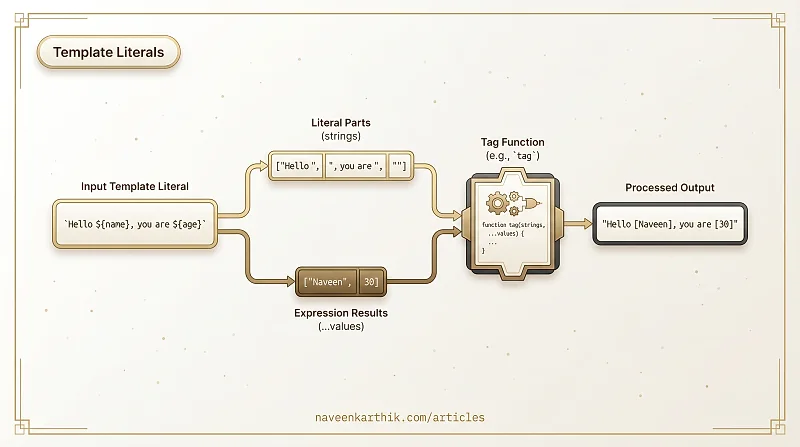
A tagged template is a function call where the template literal is broken into pieces and passed to a function. Here's how the engine splits the template:
tag`Hello ${name}, you are ${age} years old`
         ┬              ┬
         └── value[0]   └── value[1]

strings: ["Hello ", ", you are ", " years old"]  ← always one more than values
values:  [  name  ,      age     ]
The tag function stitches them back together however it wants.
Loading editor...
The strings array always has one more element than values. The raw template parts (including escape sequences) are accessible via strings.raw.
5. Practical Tag — Building a Styled-Components–like Function
Build a CSS-in-JS function similar to how styled-components works:
Loading editor...
6. Practical Tag — Safe HTML Escaping
A tag function that escapes HTML to prevent XSS:
Loading editor...
Compare with dangerously injecting unescaped input:
Loading editor...
7. Practical Tag — Styled Components Lite
A minimal CSS-in-JS tag that auto-injects styles into the DOM:
Loading editor...
8. String.raw — Raw Strings
String.raw is a built-in tag that treats escape sequences as literal characters:
Loading editor...
Key Takeaways
- Template literals use backticks and
${expr}for interpolation — cleaner than concatenation. - Multiline strings are preserved as-is — no
\nescapes needed. - Tagged templates let a function process the literal parts and interpolated values — the foundation of styled-components, GraphQL template literals, and safe HTML libraries.
String.rawpreserves escape sequences as literal characters — useful for regex and Windows paths.- Always escape user input in HTML templates — tagged templates make this systematic.