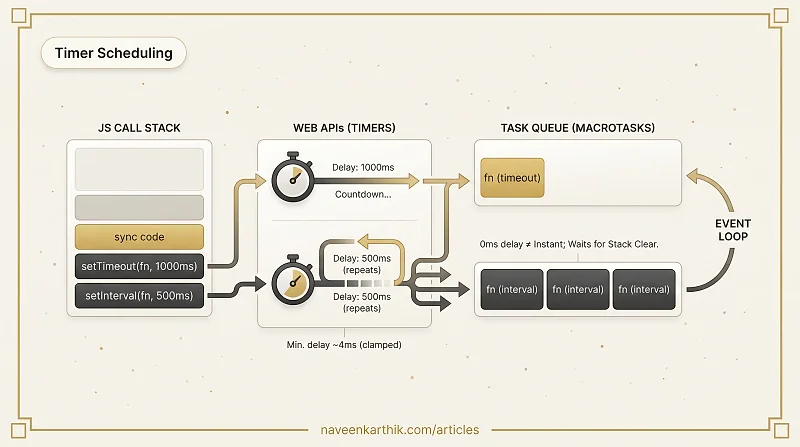
Browsers give you two built-in functions to schedule code in the future: setTimeout runs a callback once after a delay, and setInterval runs it repeatedly. They look simple, but understanding how they actually work — and where they fit inside the event loop — changes how you write async code.
Every example below is editable and runnable. Click Edit to modify the code, ▶ Run to execute it, and Stop to halt any ongoing intervals.
1. setTimeout — Run Code Once After a Delay
setTimeout(callback, delayMs) schedules callback to run at least delayMs milliseconds from now. It returns a numeric ID you can use to cancel it.
Loading editor...
Notice the order: "Script ends" prints before the timeout fires. The callback is queued as a task and only runs after the current synchronous code completes.
2. Passing Arguments to the Callback
You can pass extra arguments directly to setTimeout — they get forwarded to your callback:
Loading editor...
This avoids wrapping in an arrow function just to pass data.
3. clearTimeout — Cancel Before It Fires
setTimeout returns an ID. Pass it to clearTimeout(id) to cancel the pending callback before it runs:
Loading editor...
If the timer has already fired, clearTimeout is a no-op — safe to call regardless.
4. setInterval — Repeat on a Fixed Schedule
setInterval(callback, delayMs) fires the callback every delayMs milliseconds until you stop it. It also returns a numeric ID.
Loading editor...
Always store the ID — without it you cannot stop the interval.
5. clearInterval — Stop a Running Interval
clearInterval(id) halts an interval. You can call it from inside the callback (as above) or from any external trigger:
Loading editor...
Combining setTimeout + clearInterval is a clean pattern for "run for N seconds then stop."
6. The Event Loop — Why setTimeout(0) Isn't Instant
Both setTimeout and setInterval don't run inside the JS engine — they're Web APIs. When the delay expires, the browser pushes the callback into the task queue. The event loop only picks it up once the call stack is empty.
That means setTimeout(fn, 0) still runs after all synchronous code in the current script:
Loading editor...
Output is always 1 → 2 → 3. The "0ms" delay means "as soon as the stack is free," not "right now."
7. Nested setTimeout vs setInterval — The Drift Problem
setInterval fires every N ms from the start of the previous call, regardless of how long the callback takes. If your callback is slow, ticks can overlap or bunch up.
Nested setTimeout reschedules itself after the callback completes, giving you a guaranteed gap between runs:
Loading editor...
For most UI work the difference is invisible. For precise sequencing — like an animation step that does heavy work — nested setTimeout gives you tighter control.
8. Minimum Delay — The 4ms Floor
Browsers clamp timer delays to a minimum of ~4ms for nested timers (after the 5th nesting level). A delay of 0 is rounded up too. This is per the HTML spec to prevent CPU-hammering infinite loops.
Loading editor...
You'll see the first few ticks fire near 0ms, then the delay starts accumulating as the browser enforces the floor.
9. Practical — Countdown Timer
A classic use case: count down from N to 0 using setInterval, then stop.
Loading editor...
Try editing the starting value or the interval delay and hit ▶ Run again. Hit Stop if the count runs longer than expected.
Key Takeaways
setTimeout | setInterval | |
|---|---|---|
| Fires | Once, after delay | Repeatedly, every delay |
| Cancel | clearTimeout(id) | clearInterval(id) |
| Drift risk | None | Yes — callback duration isn't counted |
| Alternative | — | Nested setTimeout for drift-free repeats |
- Timers are Web APIs — they schedule tasks, not microtasks. They run after the current call stack clears.
setTimeout(fn, 0)is useful for deferring work to after a render cycle, not for "immediate" execution.- Always clear intervals you no longer need — forgotten intervals are a classic source of memory leaks.