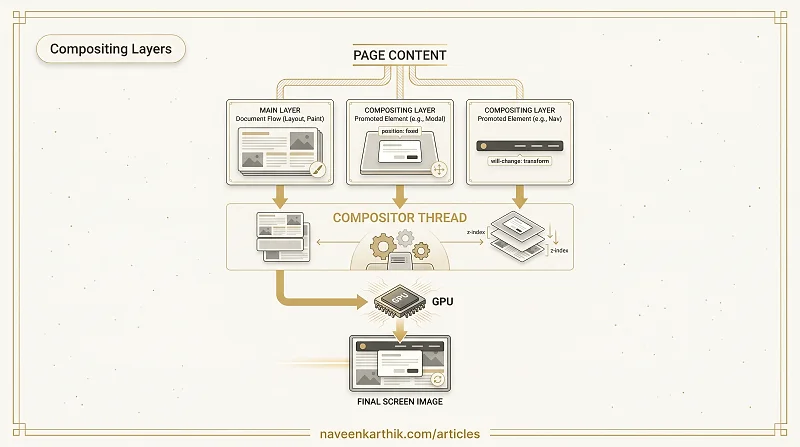
A compositing layer is a portion of a web page that the browser paints as an independent bitmap and hands to the GPU to be composited (combined) into the final screen image — separately from the rest of the page.
By default, the browser paints everything into a single layer. Compositing layers are the exception: the browser promotes specific elements to their own layer when it determines they'll change independently from everything else.
How the browser builds the final image
After layout and paint, the browser has one or more painted bitmaps (layers). The compositor thread takes these bitmaps, positions them correctly (respecting z-index, transforms, and scroll position), and hands the result to the GPU to display.
Page content
    │
    ▼ Layout → Paint
┌────────────────────┐   ┌──────────────┐   ┌──────────┐
│ Main layer         │   │ Modal layer  │   │ Nav layer │  ← separate bitmaps
│ (most of the page) │   │ (position:   │   │ (sticky)  │
│                    │   │  fixed)      │   │           │
└────────────────────┘   └──────────────┘   └──────────┘
                    │           │                 │
                    └───────────┴─────────────────┘
                                │
                          Compositor thread
                                │
                          Final screen image
What triggers layer promotion
The browser creates a new compositing layer for an element when:
- It has a CSS
transformapplied (includingtransform: translateZ(0)) - It has
will-change: transformorwill-change: opacity - It has an animated
opacityortransform - It has
position: fixedorposition: sticky - It uses
<video>,<canvas>, or<iframe> - It uses
overflow: scrollin some cases
Why compositor-thread layers are fast
The key benefit: the compositor thread runs separately from the main thread. When an element is on its own layer and you animate its transform or opacity, the compositor can update the position/opacity of the pre-painted bitmap directly — no layout, no paint, no JavaScript involvement.
This is why transform and opacity are the only two CSS properties considered "free" for animation — everything else forces at least a repaint, and geometry changes force a full reflow.
The cost of too many layers
Layers are not free. Each layer is a separate bitmap stored in GPU memory. Creating too many wastes memory and can make compositing itself slow.
Layer explosion — where a single will-change on a parent causes all its children to get their own layers — is a real performance problem on mobile. Chrome DevTools → Layers panel shows you exactly which elements have layers and how much GPU memory they're consuming.
Inspecting layers in DevTools
- Open Chrome DevTools → More tools → Layers
- The 3D view shows every compositing layer on the page
- Click a layer to see what triggered its promotion ("backingStoreType", "transform3D", etc.)
The Performance panel also shows "Composite Layers" as a distinct step in the rendering timeline. If compositing takes a long time, you likely have too many layers.
Compositing layers are the browser's mechanism for GPU-accelerated rendering. Used correctly — transform and opacity animations on promoted elements — they make animations silky smooth at no cost to the main thread. Used incorrectly, they waste memory and can actually slow the page down.