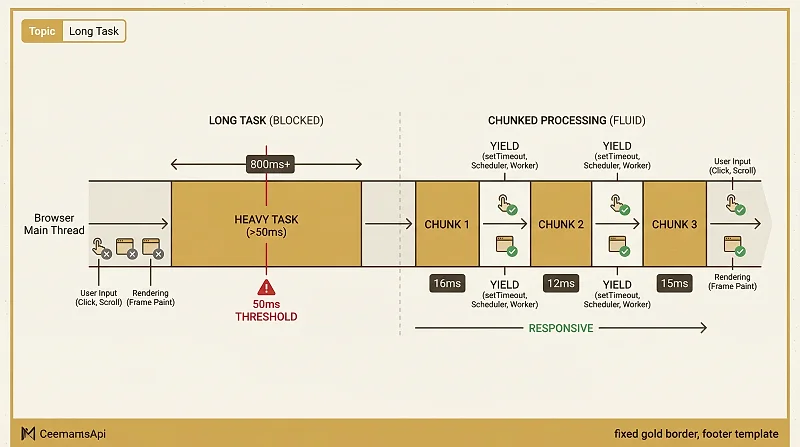
A long task is any piece of work that runs on the browser's main thread for more than 50 milliseconds without yielding.
The 50ms threshold isn't arbitrary. At 60fps, the browser has 16.67ms per frame. A task longer than 50ms means at least 3 frames were blocked. Research from Google shows that users start perceiving a response as laggy around 100ms after an interaction — 50ms leaves a buffer for the browser to handle the actual rendering work after the task ends.
What happens during a long task
While a long task is running, everything else on the main thread waits:
- User input (clicks, keypresses, scroll) is queued but not handled
- Animations freeze
- No new frames are painted
- React cannot run state updates or re-renders
The user experience: the page appears frozen. Buttons don't respond. Scroll doesn't scroll.
How to find long tasks
Chrome DevTools → Performance tab: Record a profile and look for red triangles at the top of tasks in the flame chart. Any task wider than 50ms gets a red marker. The "Bottom-Up" and "Call Tree" tabs show you exactly which function consumed the time.
PerformanceObserver API:
Lighthouse: The "Total Blocking Time" metric is the sum of the blocking portions of all long tasks (the time each task spent beyond 50ms) during page load.
How to break up long tasks
1. Chunked processing with setTimeout
The simplest yield point: setTimeout(..., 0) schedules the next chunk as a new task, giving the browser a chance to handle input and render a frame between chunks.
2. Scheduler API (isInputPending)
3. Web Workers
Move the work off the main thread entirely. Web Workers run in a separate thread with no access to the DOM, but are ideal for CPU-heavy computation that doesn't need to touch the UI.
4. React's startTransition
For React-specific long tasks, startTransition tells React a state update is non-urgent — React will yield the thread between fiber chunks and process higher-priority updates (like input handling) first.
Long tasks and Core Web Vitals
Long tasks directly impact Interaction to Next Paint (INP) — the Core Web Vital that measures responsiveness. Every long task that runs after a user interaction delays the next paint. Eliminating long tasks during page load also improves Total Blocking Time (TBT), a Lighthouse proxy metric.
50ms is the line between "fast enough" and "the user noticed." Any single task that crosses it is a long task, and the fix is always the same: yield, chunk, or move the work somewhere else.