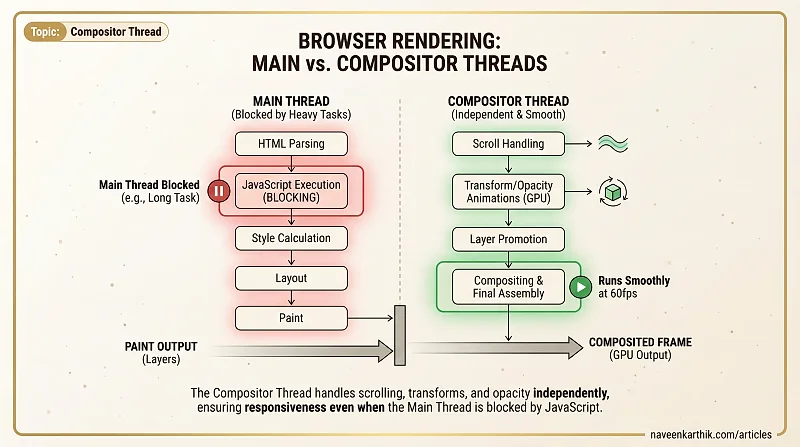
The compositor thread is a separate browser thread that assembles painted layers into the final image displayed on screen. It runs independently of the main thread — which means it keeps working even when JavaScript is blocking everything else.
Main Thread vs Compositor Thread
The browser's rendering pipeline splits work across two threads:
| Task | Main thread | Compositor thread |
|---|---|---|
| HTML parsing | ✓ | |
| JavaScript execution | ✓ | |
| Style calculation | ✓ | |
| Layout | ✓ | |
| Paint | ✓ | |
| Compositing | ✓ | |
| Scroll handling (most cases) | ✓ | |
| Touch / gesture input | ✓ |
The compositor thread's job is the final assembly: take the layers produced by paint, combine them in the correct stacking order, apply transforms and opacity, and output the frame to the GPU.
Why a Separate Thread Matters
Because the compositor runs on its own thread, it's not blocked by JavaScript. A page with a heavy main-thread workload — a long task eating 300ms of processing — cannot parse HTML, calculate styles, or respond to click events during that window. But it can still:
- Scroll (the compositor handles wheel/touch events)
- Run CSS
transformandopacityanimations - Composite previously painted layers
This is why transform and opacity animations are called "free" — they live entirely on the compositor thread:
This isn't a theoretical distinction. On a page running heavy JavaScript, a left-based animation will stutter or stop. A transform-based animation continues at 60fps.
How Layers Get to the Compositor
Not every element gets its own compositor layer. The browser promotes elements to separate layers when:
- The element has
will-change: transformorwill-change: opacity - The element is animating
transformoropacity - The element is a
<video>,<canvas>, or<iframe> - The element has
position: fixedorposition: sticky - The element has
overflow: scroll
You can inspect layers in DevTools → More Tools → Layers. Each layer is a GPU-backed bitmap — which means each one consumes GPU memory. This is why blanket will-change: transform on every element is an anti-pattern.
The Compositor and Scrolling
Modern browsers handle scrolling on the compositor thread. When you scroll, the compositor can reposition existing layers without involving the main thread. This is why pages with position: fixed elements stay smooth during scroll — the fixed element is its own composited layer.
However, if a scroll event listener calls event.preventDefault(), the browser must wait for the main thread to decide whether the scroll can proceed. This is why passive event listeners ({ passive: true }) are important — they tell the browser "I won't cancel this scroll, go ahead on the compositor."
The compositor thread is the reason animations can stay smooth and pages can scroll while the main thread is under load. Keeping work on the compositor — transform, opacity, passive scroll listeners — is one of the most reliable ways to maintain 60fps on a complex page.