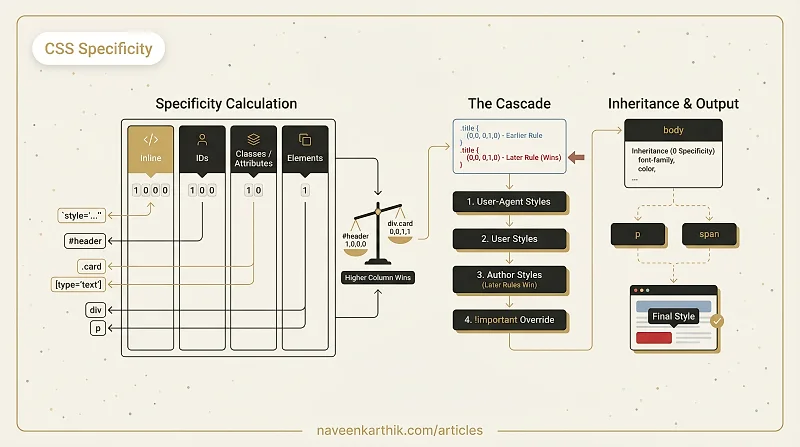
CSS Specificity is the system browsers use to decide which style rule wins when multiple rules target the same element. It's a weight-based scoring system — each selector type contributes points, and the rule with the highest total wins.
How Specificity Is Calculated
Specificity is a four-column score: inline, IDs, classes/attributes/pseudo-classes, elements/pseudo-elements.
| Selector | Inline | IDs | Classes/attrs | Elements |
|---|---|---|---|---|
div | 0 | 0 | 0 | 1 |
.card | 0 | 0 | 1 | 0 |
#header | 0 | 1 | 0 | 0 |
div.card | 0 | 0 | 1 | 1 |
#nav .link | 0 | 1 | 1 | 0 |
style="..." | 1 | 0 | 0 | 0 |
Each column is independent — higher columns always beat lower ones. A selector with 1 ID always beats a selector with 1000 classes. Think of it as comma-separated numbers: 0,1,0,0 beats 0,0,99,0.
The Cascade: What Happens When Specificity Is Equal
When two rules have the same specificity, the cascade kicks in: the rule that appears later in the stylesheet wins.
Source order also applies across origins. The cascade order, from lowest to highest priority:
- User-agent styles (browser defaults)
- User styles (browser extensions, user preferences)
- Author styles (your CSS)
- Author
!important - User
!important - User-agent
!important
Inheritance
Some CSS properties inherit — they flow from parent to child automatically:
Properties like color, font-size, font-family, line-height, text-align, and visibility inherit. Properties like width, height, margin, padding, border, display, and background do not.
Inherited values have zero specificity — any direct rule on the element, even with a universal selector (*), overrides the inherited value.
!important
!important bypasses specificity entirely for the property it's applied to. It creates a separate cascade tier:
!important on a shorthand property (background) breaks into individual properties. It doesn't make the entire rule !important — just the declarations marked with it.
Overusing !important makes the cascade unmanageable. It's a last resort for overriding styles you don't control (third-party embeds, injected stylesheets), not a tool for your own CSS.
Why Specificity Matters for Performance
The browser resolves specificity and cascade during CSSOM construction — step 2 of the rendering pipeline. Deeply nested selectors don't just make CSS harder to maintain; they cost more to match:
Modern browsers are extremely fast at selector matching, so specificity alone is rarely a bottleneck. But the pattern it encourages — shallow, class-based selectors — produces smaller stylesheets that parse faster and are easier to reason about.
Specificity is one of those concepts that feels like trivia until a style isn't applying and you can't figure out why. Understanding the four-column system — inline > ID > class > element — makes those debugging sessions ten seconds instead of ten minutes.