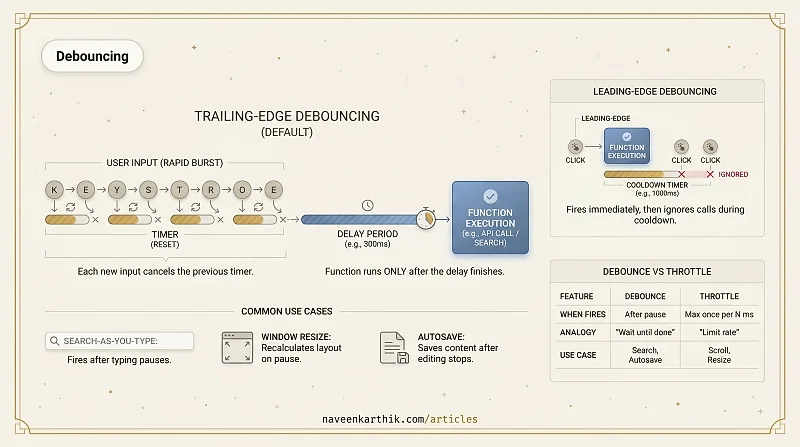
Debouncing is a technique that ensures a function is called only once after a burst of rapid invocations stops for a specified delay. The most common use case: a search input that should only fire an API call after the user finishes typing, not on every keystroke.
How It Works
Each call resets the timer. The function only runs when calls stop arriving for the full delay period:
If the user types continuously, the function never fires — each keystroke cancels the previous timer. The function only executes when there's a 300ms pause.
Trailing-Edge vs Leading-Edge
The example above is trailing-edge debouncing — the function runs after the burst ends. This is the default and the right choice for search-as-you-type.
Leading-edge debouncing fires the function immediately on the first call, then ignores subsequent calls until the delay passes:
Leading-edge is appropriate for button clicks — you want the action to happen immediately on the first click, but ignore double-clicks or rapid repeated clicks.
Common Use Cases
Search-as-you-type. The canonical example. Without debouncing, a user typing "javascript" fires 10 API calls — one per keystroke. With debouncing, it fires one call after they pause.
Window resize handlers. The resize event can fire dozens of times per second during a drag. Recalculating layout on every event is wasteful; debouncing runs the recalculation once when the user stops resizing.
Autosave. Debounce the save call so it fires after the user stops editing, not on every keystroke.
Debouncing vs Throttling
| Debounce | Throttle | |
|---|---|---|
| When it fires | After a pause (no calls for N ms) | At most once every N ms |
| Best for | Final state matters (search, autosave, resize end) | Regular updates during motion (scroll position, progress) |
| Analogy | "Wait until the user is done" | "Don't call more than X times per second" |
Debouncing answers "what's the final value?" — the search query after the user stops typing. Throttling answers "what's the value right now?" — the scroll position at this instant, updated at a controlled rate.
Debouncing is a simple pattern with a high return — a few lines of code can eliminate dozens of unnecessary network calls or layout recalculations. The key decision is choosing the right delay: too short and you don't save much work, too long and the UI feels sluggish. 200–300ms is a good starting point for search; 500–1000ms for autosave.