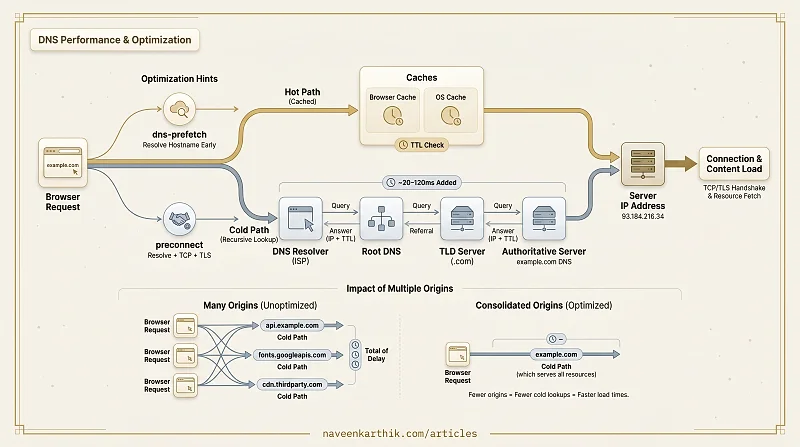
DNS (Domain Name System) translates human-readable domain names like example.com into machine-routable IP addresses like 93.184.216.34. Every network request starts with DNS — before the browser can connect to a server, it must resolve the hostname.
How DNS Resolution Works
When you type a URL, the browser performs a recursive lookup through a hierarchy of DNS servers:
Steps 4–6 only happen on a cold lookup — when no cache at any level has the answer. Once resolved, the IP is cached at every layer (browser, OS, resolver) according to the domain's TTL (Time to Live). Most subsequent resolutions are instant.
A cold DNS lookup typically adds 20–120ms to the first request to a new domain.
DNS and Performance
DNS is the first step before any connection can happen. Every new origin your page references — CDN, font provider, analytics — requires its own DNS resolution:
Each cold DNS lookup adds latency before the browser can even start the TCP handshake. On a page with resources from five different origins, that's potentially 5 × 50ms = 250ms of DNS overhead before any content arrives.
Reducing DNS Cost
Use fewer origins. Every unique hostname is a potential DNS lookup. Consolidate resources onto as few origins as possible — serve fonts from your own CDN domain rather than a third-party font provider.
Prefetch DNS for third-party origins you can't avoid:
The browser resolves the hostname as soon as it sees the hint — by the time the actual request is made, the DNS lookup is already complete.
Preconnect for critical origins. preconnect goes further — it performs DNS + TCP + TLS handshakes:
DNS Caching TTL
Every DNS record has a TTL (Time to Live) set by the domain owner. Low TTLs (60–300s) allow fast DNS changes (failover, migration). High TTLs (3600–86400s) improve performance by keeping the record in caches longer.
For static content served from a CDN, a high TTL is appropriate — the IP rarely changes. For critical infrastructure where you need fast failover, lower TTLs give flexibility at a small performance cost.
Common DNS Pitfalls
Too many origins. Each third-party tag (chat widget, analytics, A/B testing, ad network) adds its own DNS lookup. Audit your origins regularly.
Missing dns-prefetch for critical third parties. If a font provider or CDN domain is essential for first paint, prefetch it early in <head>.
CNAME flattening. Some CDNs require a CNAME record that adds an extra DNS lookup. Modern DNS providers offer CNAME flattening or ALIAS records to resolve the chain at the authoritative level, eliminating the extra round trip for users.
DNS is invisible until it isn't — and when it shows up, it shows as a mysterious 100ms delay before anything loads. The fix is usually simple: fewer origins and strategic dns-prefetch / preconnect hints for the ones you keep.