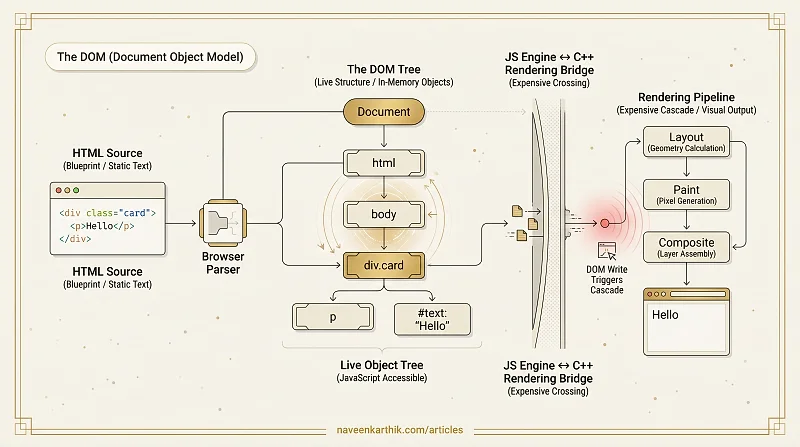
The DOM (Document Object Model) is the browser's live, in-memory tree representation of an HTML document. When you write <div class="card"><p>Hello</p></div>, the browser doesn't see a string — it sees a tree of node objects, each with properties, methods, and relationships to other nodes.
HTML Source vs the DOM
The HTML you write is a text file. The DOM is what the browser's parser produces from that text — a structured, programmatically accessible object tree. The two can diverge:
- The browser fixes malformed HTML (missing closing tags, unclosed quotes) in the DOM
- JavaScript can modify the DOM (
appendChild,innerHTML,remove) without touching the HTML source - The DOM includes nodes created dynamically that were never in the HTML
Think of the HTML source as the blueprint and the DOM as the building that gets constructed, renovated, and lived in.
Nodes, Elements, and the Tree Structure
The DOM is a tree of nodes. There are several node types:
| Type | Example | Node constant |
|---|---|---|
| Element | <div>, <p>, <span> | Node.ELEMENT_NODE (1) |
| Text | "Hello World" inside a <p> | Node.TEXT_NODE (3) |
| Comment | <!-- a comment --> | Node.COMMENT_NODE (8) |
Every element is a node, but not every node is an element. Text content between tags becomes text nodes. The childNodes property includes all node types; children only includes elements.
Why DOM Operations Are Expensive
Touching the DOM is one of the most expensive things JavaScript can do. The reason is structural: the DOM lives in the browser's C++ side. Every time JavaScript reads from or writes to the DOM, it crosses the bridge between the JS engine and the browser's rendering engine. That crossing has overhead.
More importantly, DOM writes can trigger the rendering pipeline:
element.style.width = '200px'     // invalidates layout
element.offsetHeight               // forces synchronous layout recalculation
element.classList.add('visible')   // invalidates paint
A single property change can cascade — the browser must recalculate the geometry of every element that comes after the changed one, then repaint the affected regions. Doing this in a loop is layout thrashing.
Live vs Static
The DOM is live — any change is immediately reflected. A reference to an element is always up-to-date with the current state of the page:
This is powerful but can be surprising. getElementsByClassName() and getElementsByTagName() return live HTMLCollections; querySelectorAll() returns a static NodeList (snapshot).
The DOM and the Rendering Pipeline
The DOM is step 1 of the browser's rendering pipeline. After parsing HTML into the DOM, the browser builds the CSSOM from stylesheets, then merges both into the Render Tree. The DOM alone contains all content but no styling information. The Render Tree only includes visible nodes with their computed styles — display: none elements are in the DOM but not in the Render Tree.
React and other frameworks introduced the Virtual DOM — a lightweight JavaScript copy — precisely because touching the real DOM is expensive. Batching changes in JavaScript and applying the minimal set of real DOM mutations is faster than modifying the live DOM directly on every state change.