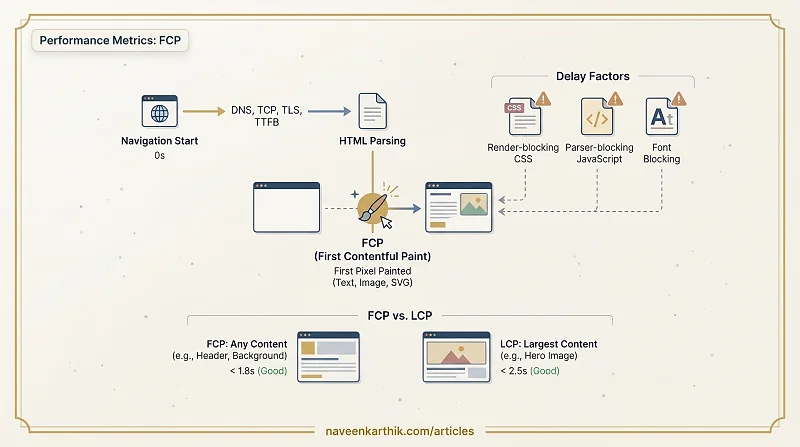
First Contentful Paint (FCP) measures the time from when the page starts loading to when any content — text, image, canvas, SVG — first appears on screen. It marks the first moment the user sees something rather than a blank white page.
What It Measures
FCP answers a simple question: how long does the user stare at a blank screen? It's the first visual feedback that the page is loading.
FCP is not the largest or most important content — it's the first content of any kind. A page could have excellent FCP (a header rendered quickly) and still have slow LCP (the hero image arrives late).
Thresholds
| Rating | FCP |
|---|---|
| Good | ≤ 1.8s |
| Needs improvement | 1.8s – 3.0s |
| Poor | > 3.0s |
These are Google's field-data thresholds, based on the 75th percentile of real-user experiences.
What Delays FCP
FCP lives on the critical rendering path. Everything that blocks the first paint hurts FCP:
Render-blocking CSS. The browser won't paint until all stylesheets are parsed. A large CSS file on a slow connection directly delays FCP.
Parser-blocking JavaScript. A <script> tag in <head> (without async or defer) halts the parser. No DOM nodes, no FCP.
Slow TTFB. Time to First Byte is the gate every other metric waits behind. If the server takes 2 seconds to send the first byte of HTML, FCP cannot possibly be under 2 seconds.
Font blocking. font-display: block can hide text for up to 3 seconds while fonts download. The browser has the content ready but won't show it.
How to Improve It
The principle is consistent: remove everything from the critical path that isn't essential for the first pixel. Inline critical styles, defer scripts, use system fonts or font-display: swap, and reduce TTFB with a CDN.
FCP vs LCP
| FCP | LCP | |
|---|---|---|
| What it measures | First paint of any content | Paint of the largest visible element |
| Typical element | Small text, background color | Hero image, heading block |
| Threshold (good) | ≤ 1.8s | ≤ 2.5s |
| Addressed by | Reducing blocking resources | Optimizing the critical resource itself |
FCP is a milestone check: is the page doing anything? LCP is a quality check: is the main content here?
FCP is often the first metric to move when you optimize the critical rendering path. It responds directly to the techniques that shorten the CRP — inline CSS, deferred scripts, and fast TTFB. If FCP is poor, the user is staring at a blank screen; nothing else matters until that's fixed.