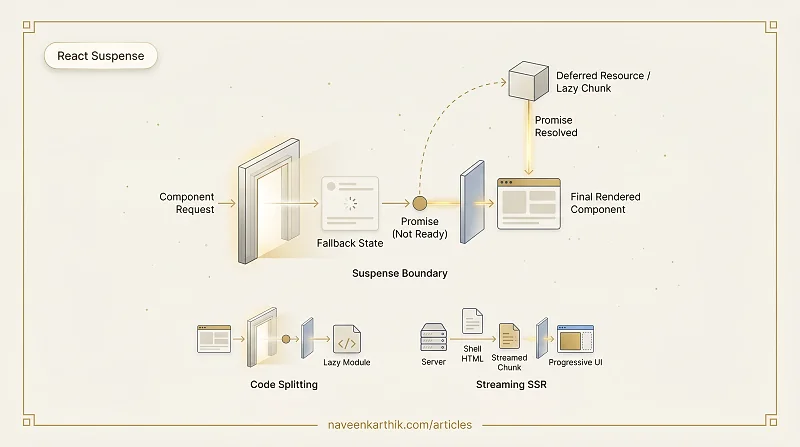
React Suspense is a mechanism that lets a component "wait" for something before rendering — usually a lazy-loaded code chunk or a data fetch. While waiting, it shows a fallback (a spinner, skeleton, or placeholder). Suspense is the boundary: it catches the in-progress state and renders the fallback until the child components are ready.
Suspense for Code Splitting
The most common use: React.lazy() defers loading a component until it's first rendered. Suspense catches the loading state:
When React reaches <HeavyChart />, it sees the component isn't loaded yet. It walks up the tree to the nearest <Suspense> boundary and renders its fallback instead. When the import resolves, React replaces the fallback with the real component.
Without Suspense, you'd need loading state, error state, and manual coordination — Suspense collapses all of that into a declarative boundary.
How It Works Under the Hood
Suspense relies on a capability added in React 16.6: components can throw promises. When React.lazy() encounters an unloaded component, it throws the import promise. React catches it at the nearest Suspense boundary, renders the fallback, and waits. When the promise resolves, React re-renders the suspended subtree.
This is an intentional design choice — "throwing" a promise during render signals to React "I'm not ready yet, come back when I am."
Multiple Suspense Boundaries
You can nest Suspense boundaries to control the loading experience granularly:
The outer boundary waits for everything. Inner boundaries isolate loading states — MainContent and Sidebar load independently. If Sidebar takes longer, only the sidebar section shows its skeleton; the main content renders as soon as it's ready.
Suspense and Streaming SSR
React 18 introduced streaming SSR with Suspense. The server sends HTML in chunks as components resolve, rather than waiting for the full page:
The browser receives the shell HTML immediately. <Reviews> arrives later — when its server-side data fetch completes — as an additional chunk of HTML streamed into the page. This eliminates the all-or-nothing wait of traditional SSR.
What Suspense Is NOT
Suspense is not a data-fetching library. It's a coordination mechanism. You still need a data-fetching solution that integrates with Suspense — React Query, SWR, or frameworks like Next.js that provide async Server Components.
Suspense also isn't an error boundary. Use <ErrorBoundary> (or React's built-in error boundary support) alongside Suspense to handle both the loading and error states cleanly.
When to Use It
- Route-level code splitting. Wrap each route in
SuspensewithReact.lazy(). - Heavy components below the fold. Charts, editors, maps — split them out and load on demand.
- Streaming SSR. Mark slow server-side data dependencies with Suspense boundaries for progressive HTML delivery.
Suspense is a declarative loading state primitive. It takes what used to be imperative boilerplate — isLoading, setIsLoading, spinner rendering logic — and replaces it with a boundary that says "if anything in here isn't ready, show this fallback."