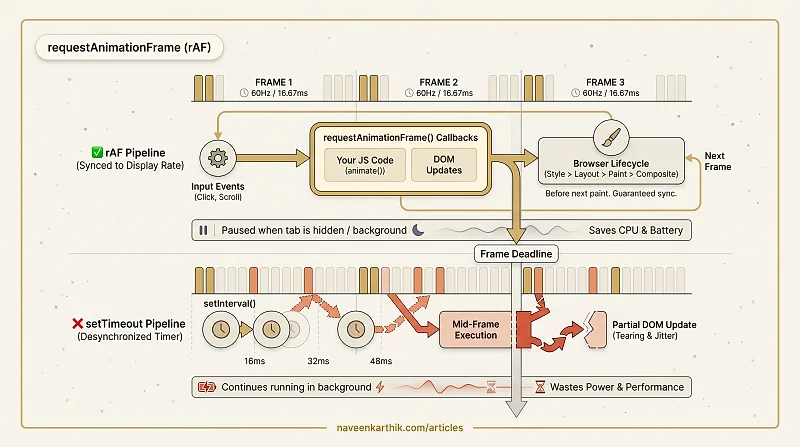
requestAnimationFrame (rAF) is the browser's API for scheduling JavaScript code to run before the next frame is painted. It's the correct tool for JS-driven visual updates — animations, scroll-linked effects, canvas drawing — because it synchronizes with the display refresh rate rather than running on an arbitrary timer.
How It Works
When you call requestAnimationFrame(callback), the browser queues callback to run just before the next repaint. The callback receives a DOMHighResTimeStamp — the time in milliseconds since the page loaded:
The browser calls your callback once per frame — 60 times per second at 60Hz, 120 times at 120Hz. If the tab is hidden or the page is in the background, the callbacks are paused entirely. This prevents wasted battery and CPU on work the user can't see.
rAF vs setTimeout / setInterval
Using setInterval(fn, 16) for animation is fundamentally broken for three reasons:
1. Doesn't match the display rate. A 60Hz display refreshes every 16.67ms, not 16ms. The mismatch causes tearing — the animation updates between frames, so the screen shows a partially updated state.
2. Runs when the tab is hidden. setInterval keeps firing even when the user is looking at another tab. rAF pauses entirely, saving CPU and battery.
3. No frame budget awareness. setInterval knows nothing about layout, paint, or compositing deadlines. rAF runs at the correct point in the frame lifecycle — after style/layout but before paint.
The Frame Lifecycle
rAF callbacks run at a specific point in each frame:
Because rAF runs before style and layout, it's safe to make DOM changes — the browser will include them in the upcoming frame rather than forcing a mid-frame recalculation.
Cancelling
requestAnimationFrame returns a numeric ID. Pass it to cancelAnimationFrame(id) to stop:
This is equivalent to clearTimeout / clearInterval for timers. Always store the ID if you need to cancel.
When to Use rAF
- Canvas drawing loops
- JS-driven animation (when CSS animations aren't flexible enough)
- Scroll-linked effects (parallax, sticky headers, progress indicators)
- Batching DOM reads/writes for the next frame
When NOT to Use rAF
- Simple state transitions — use CSS transitions or
@keyframesinstead, which run on the compositor thread - Non-visual work — use
setTimeoutorrequestIdleCallback - Work that must run at an exact interval — rAF adapts to the display rate and pauses when hidden
requestAnimationFrame is the bridge between JavaScript and the browser's frame cycle. If you're animating with JavaScript and not using rAF, you're fighting the display hardware. The API exists precisely so you don't have to.