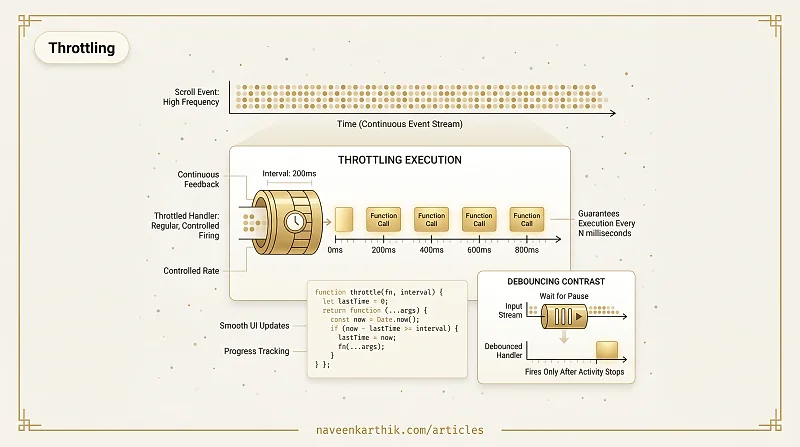
Throttling is a technique that limits a function to run at most once every N milliseconds, regardless of how often it's called. Unlike debouncing (which waits for a pause), throttling guarantees regular execution — it fires at a controlled rate as long as the triggering event continues.
How It Works
A throttle wraps the function so that once it fires, subsequent calls are ignored until the interval expires:
If the scroll event fires 100 times per second, the throttled handler runs at most 5 times per second (every 200ms). The calls between are silently dropped.
Why Not Just Use Debounce?
Debounce waits for a pause. During continuous activity — scrolling, dragging, game loops — debouncing would never fire at all. The user would see no progress updates until they stopped.
Throttling answers "what's the value right now?" — the scroll position, the mouse coordinates, the game state. Debouncing answers "what's the final value?" — the search query after typing stops.
Common Use Cases
Scroll position tracking. Scroll fires hundreds of times per second. Updating a progress bar, sticky header, or parallax effect doesn't need per-pixel precision — 50-100ms throttle is imperceptible.
Mouse / touch move tracking. Drawing on a canvas, dragging elements, or tracking cursor position benefits from throttled updates rather than per-pixel callbacks.
Infinite scroll. Check "are we near the bottom?" at a controlled rate rather than on every scroll pixel:
Rate-limited API calls. For operations with strict rate limits, throttle ensures you never exceed the allowed frequency:
Throttling vs Debouncing
| Throttle | Debounce | |
|---|---|---|
| First call | Fires immediately | Fires after the first pause |
| During burst | Fires at regular intervals | Continuously resets, never fires |
| Last call | May not fire (if burst lasts longer than one interval from the end) | Fires after the burst stops |
| Use for | Continuous feedback (scroll position, drag, progress) | Final state (search query, autosave, resize end) |
Throttling is the tool for "keep me updated regularly." It's the difference between a scroll-linked animation that runs at 60fps (track position throttled at 16ms, matching the frame rate) and one that janks (handler running on every scroll pixel). Combined with requestAnimationFrame, throttling keeps UI updates smooth without wasting main-thread time.