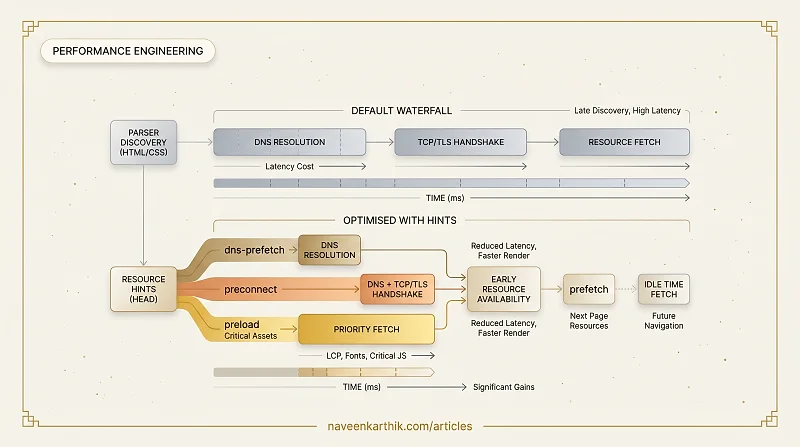
The browser discovers resources by parsing HTML and CSS — which means it can't act on them until it gets there. By then, you've already paid the latency cost. Resource hints let you break that dependency: tell the browser what's coming so it can act before the parser even sees it.
Used correctly, they eliminate dead time in the network waterfall. Used carelessly, they waste bandwidth and can even hurt performance.
dns-prefetch: Resolve Early
dns-prefetch tells the browser to resolve a hostname's DNS now, so the lookup is already complete by the time a request to that origin is made.
DNS resolution typically costs 20–120ms. For third-party origins you'll definitely use, this is a free improvement.
When to use it:
- Third-party domains for fonts, analytics, ads, CDNs
- Any cross-origin resource that isn't critical enough to warrant
preconnect
Limitations: Resolves DNS only. Does not establish a TCP connection or TLS handshake.
preconnect: Skip the Handshake
preconnect goes further — it performs DNS resolution and TCP and TLS handshakes up front, so the first actual request to that origin goes straight to sending data.
The crossorigin attribute is required when the resource will be fetched with CORS (fonts, fetched scripts). Without it, the browser opens a separate connection for the actual request.
When to use it:
- Origins you'll make critical requests to very soon (fonts, API endpoints, CDN)
- No more than 2–3 origins — each open connection consumes resources
Don't overuse it. Every preconnect consumes TCP/TLS handshake capacity and holds open a connection for 10 seconds. Unused preconnects waste bandwidth and can compete with real requests.
preload: Fetch Critical Assets Now
preload tells the browser to fetch a specific resource at high priority, regardless of when the parser discovers it. This is where resource hints get genuinely powerful — and genuinely dangerous if misused.
The as attribute is mandatory — it tells the browser what type of resource to expect, which controls the fetch priority and ensures the response goes into the right cache. Without as, the browser cannot determine the resource type and the preload is ignored entirely. The response lands in a generic fetch cache instead of the correct dedicated cache (CSS, script, font, image), so even if it downloads, it won't match the actual request when the resource is later used.
When to use it:
- Your LCP image (especially if it's set as a CSS
background-image, which the parser can't discover) - Critical web fonts
- A script that would otherwise be discovered late in the waterfall
Warning: preload is a strong command. The browser will fetch it, whether or not the page actually uses it. An unused preload is a wasted high-priority request that competes with everything else. Always confirm the resource is actually used on the page.
prefetch: Fetch for the Next Page
prefetch is a low-priority hint to fetch a resource that will be needed for a future navigation — a link the user is likely to click next.
The browser fetches the resource during idle time, after the current page has loaded. The response is stored in the HTTP cache and used when the user navigates.
When to use it:
- Scripts or data for the next likely page
- Images for the next slide in a carousel
- Paginated content (next page of a list)
Don't use it for: resources needed on the current page — use preload instead. prefetch is explicitly lower priority than the current page's resources.
modulepreload: ES Module Optimisation
For ES module scripts, modulepreload is a specialised form of preload that also parses and compiles the module (and its static imports) proactively:
Without this, each module in the import graph is discovered and fetched sequentially. modulepreload flattens the waterfall for module trees.
Summary: Which Hint to Use
| Hint | What it does | Use for |
|---|---|---|
dns-prefetch | DNS only | Third-party origins used soon |
preconnect | DNS + TCP + TLS | Critical third-party origins |
preload | High-priority fetch for current page | LCP image, critical fonts, late-discovered JS |
prefetch | Low-priority fetch for next page | Resources for the likely next navigation |
modulepreload | Fetch + parse ES module tree | Entry-point modules |
Common Mistakes
Preloading too much: Adding preload to 10 resources doesn't help — it just floods the network with high-priority requests. Limit preloads to 2–3 truly critical resources.
Missing crossorigin on font preloads: Fonts fetched with CORS need crossorigin on the preload tag or the browser makes two requests.
Using preload instead of prefetch for next-page resources: Preloaded resources are fetched at high priority on the current page, competing with the resources you actually need now.
Adding hints without measuring: Resource hints are hints — their actual benefit depends on the network waterfall of your specific page. Always verify with Lighthouse or WebPageTest that they're shortening time-to-first-byte or time-to-LCP, not just adding requests.
Preloading resources with short cache lifetimes: If you preload a resource with Cache-Control: no-cache or a very short max-age, the preloaded version may be stale by the time the page actually uses it (especially if the preload finishes in the <head> but the resource isn't consumed until after a user interaction). Preload is most effective for long-lived, deterministic resources like versioned assets.
The right set of resource hints is small and deliberate — a few targeted preconnect and preload tags based on real waterfall analysis will do more than a dozen hints added by instinct.