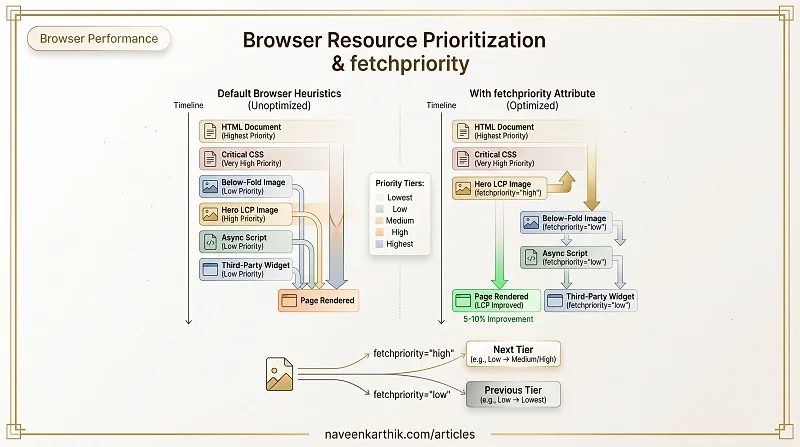
The browser fetches dozens of resources during a page load and has to decide what order to request them. Its heuristics are good but not perfect — it doesn't know that your hero image matters more than a below-fold carousel image, or that one analytics script is less important than your app bundle. The fetchpriority attribute lets you correct those assumptions.
How the Browser Prioritizes Resources
By default, the browser assigns priority based on resource type and position in the document:
| Resource | Default priority |
|---|---|
| HTML | Highest |
| Render-blocking CSS | Very High |
| Preloaded fonts | High |
| Images in viewport | High |
| Images outside viewport | Low |
| Async scripts | Low |
<script> in head | High |
These defaults work for most pages. Problems arise when the browser's heuristic disagrees with your actual priorities — for example, it assigns High priority to a decorative header image because it's technically "in viewport", but your LCP is a different image below it.
The fetchpriority Attribute
fetchpriority accepts three values: high, low, and auto (default).
The LCP Image Use Case
The single most impactful use of fetchpriority is on the LCP image. Without it, the browser may delay fetching it behind other High-priority resources discovered earlier in the document.
Both the preload hint and the <img> tag carry fetchpriority="high". This tells the browser unambiguously: fetch this before anything else at the same priority tier.
Google's research shows this can improve LCP by 5–10% on pages where the LCP image was already being preloaded.
Deprioritizing Non-Critical Resources
Below-fold images, non-essential third-party scripts, and deferred stylesheets can be explicitly deprioritized so they don't compete with above-fold critical resources:
fetchpriority="low" on an async/defer script effectively says: load this after my critical resources, even if the network is idle.
fetch() API
fetchpriority also works in the fetch() API via the priority option:
How Priority Tiers Work
Chrome's resource scheduler uses 5 tiers: Lowest, Low, Medium, High, Highest. Each resource type defaults to a specific tier. fetchpriority bumps a resource up or down by one tier from its default — it doesn't set an absolute priority level. For example:
- An in-viewport image is already at Low (or High on certain sites).
fetchpriority="high"bumps it to Medium/High. - An async script defaults to Low.
fetchpriority="low"drops it to Lowest.
This is why fetchpriority is described as "within the same priority tier" — it's a relative adjustment, not an absolute override.
Verifying in DevTools
Open DevTools → Network tab → right-click the column header → enable the Priority column. It shows both the Initial priority (what the browser assigned based on type + position) and the Final priority (after fetchpriority adjustments). This is how you confirm your hints are actually taking effect.
What It Doesn't Do
fetchpriority adjusts the relative priority within the browser's scheduler — it doesn't guarantee ordering. A low priority resource may still load before a high priority one if the latter is discovered later. Think of it as a hint to the scheduler, not a strict ordering constraint.
It also doesn't replace preload — you still need <link rel="preload"> to move resource discovery earlier. fetchpriority then ensures the preloaded resource is scheduled at the right tier. These browser-internal priorities are what the browser maps to HTTP/2 stream priorities and HTTP/3's extensible priority scheme (see article #15).
fetchpriority="high" on your LCP image is one of the cheapest LCP wins available — a single HTML attribute with no JavaScript required. The deprioritization side is just as useful: every non-critical resource you push down the queue is bandwidth and scheduler capacity reclaimed for what actually matters on the current page.