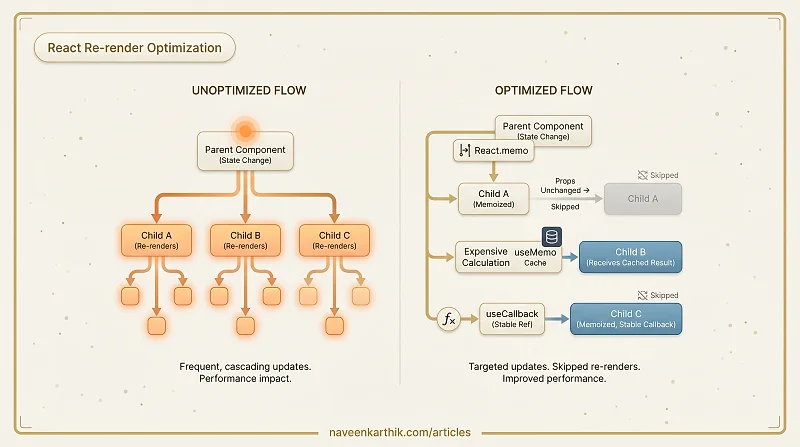
React re-renders components when state or props change. In most apps, that's fast enough to be invisible. In apps with large component trees, frequent updates, or expensive render functions, re-renders accumulate and cause sluggish interactions. React gives you several tools to control when and how components re-render.
How React Decides to Re-render
A component re-renders when:
- Its own state changes (
useState,useReducer) - Its parent re-renders (even if props haven't changed)
- A context it subscribes to changes
Re-rendering doesn't mean the DOM updates. React reconciles the new virtual DOM with the previous one and only applies actual DOM changes. But the render function itself still runs, and for expensive computations or deep trees, that has cost.
React.memo
React.memo wraps a component and skips re-rendering if its props haven't changed (shallow equality check).
When the parent re-renders, ExpensiveCard only re-renders if title or count actually changed. If they're the same reference and value, React reuses the last render output.
When not to use it: On cheap components. The props comparison has overhead — wrapping every component in memo can make your app slower, not faster.
useMemo
useMemo caches the result of an expensive calculation between renders.
The filter only re-runs when products or filter changes. If the parent re-renders for unrelated reasons, the filtered list is returned from cache.
When not to use it: For calculations that are fast (array maps, simple string operations). The memoization bookkeeping costs more than the computation itself.
useCallback
useCallback caches a function reference between renders. This matters when passing callbacks to React.memo children — a new function reference on every render breaks memo's equality check.
useCallback only matters when the callback is passed to a memo-wrapped component or used as a useEffect dependency.
The Key Prop and Reconciliation
React uses the key prop to identify list items across renders. A stable, unique key tells React "this item moved" vs "this item was destroyed and a new one created".
Using array index as key causes every list item after a deletion or insertion to re-render, because their indices shift.
Code Splitting with React.lazy and Suspense
React.lazy defers loading a component until it's first rendered. Combined with Suspense, this splits your bundle so routes and heavy components load on demand.
The HeavyChart bundle only downloads when the component is about to render. This keeps your initial bundle small and speeds up first load.
startTransition for Non-Urgent Updates
React 18's startTransition marks a state update as non-urgent. React can interrupt it to handle higher-priority updates (like typing in a search box) and resume the transition later.
Without startTransition, a heavy setResults update would block the input from updating for the duration of the render. With it, the input stays responsive.
React DevTools Profiler
The React DevTools browser extension includes a Profiler tab. Record an interaction and see:
- Which components rendered and why
- How long each render took
- Which components were skipped (memo working)
The flame chart shows render time per component. The ranked chart sorts by most time spent. This is the correct starting point before applying any of the patterns above — optimize what the profiler shows is slow, not what you assume is slow.
These tools compound each other: React.memo needs useCallback to work correctly when props include functions. useMemo only helps when its result is passed to a memo'd child — an unmemo'd child re-renders regardless. And startTransition only helps when the slow part is a render, not a network call.
Closure staleness with useCallback: An empty dependency array [] means the callback never updates — it captures the initial values of state and props forever. If your callback reads state, include that state in the dependency array. A useCallback that always sees stale values is worse than no useCallback at all.
Use the profiler first, apply targeted fixes second.