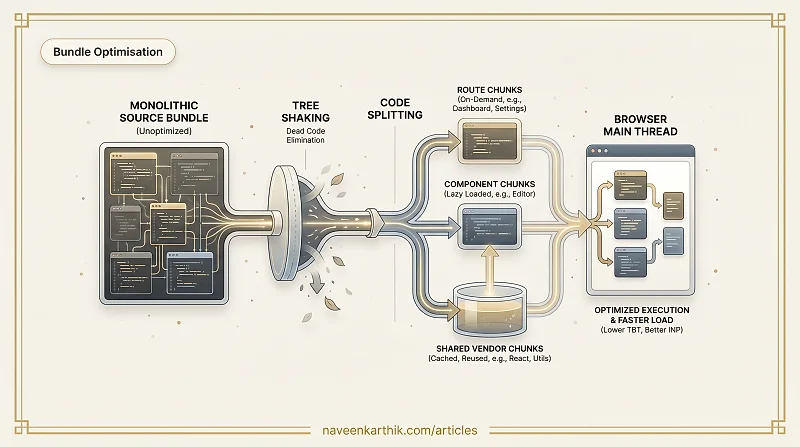
JavaScript is the most expensive resource on the web — byte for byte, it costs more than images. An image has to be decoded once; JavaScript has to be parsed, compiled, and executed on every page load. Shipping less of it, and deferring what you do ship, is one of the highest-leverage things you can do for load performance.
Bundle optimisation is the set of techniques that reduce how much JavaScript ships to the browser, and how much of it is parsed on any given page.
Why Bundle Size Matters
Network transfer time is only part of the cost. A 500KB JavaScript bundle also requires:
- Parse time: the browser must tokenise and parse the source into an AST.
- Compile time: the JS engine compiles bytecode (V8's Ignition) and potentially machine code (TurboFan).
- Execution time: the code runs on the main thread.
On mid-range mobile devices, 500KB of JavaScript can take 3–5 seconds of main thread time. This directly impacts TBT, INP, and perceived interactivity.
Tree Shaking: Dead Code Elimination
Tree shaking is the process of removing exports from a bundle that are imported but never used in the final entry point. The term comes from "shaking the tree" to make dead leaves fall off.
It requires ES module syntax (import/export), because ES module imports are statically analysable — the bundler can determine at build time which exports are actually used.
After tree shaking, multiply is not included in the bundle.
Requirements for tree shaking:
- Use ES modules (
import/export), not CommonJS (require/module.exports) - The imported module must have
"sideEffects": falsein itspackage.json(or list specific files with side effects) - Minification must be enabled (tree shaking alone doesn't remove dead code — the minifier completes the job)
Common failure modes:
❌ Importing an entire library pulls everything in:
✅ Import only what you need:
Libraries that don't ship ES modules (many older npm packages use CommonJS) can't be tree-shaken at all — check bundlephobia.com to see if a package has an ESM build.
Barrel imports can defeat tree shaking. A "barrel" file (index.js) that re-exports everything from multiple modules forces the bundler to include all re-exports even if only one is used:
The fix: either avoid barrels and import directly (import { Button } from './components/Button'), or use a bundler plugin like vite-plugin-barrel to detect and warn about barrel imports that are bloating your bundle.
Code Splitting: Load What You Need
Even with tree shaking, your entire application's JavaScript doesn't need to load on the first page. Code splitting divides the bundle into chunks that are loaded on demand.
Route-Based Splitting
The highest-value form of code splitting. Each route is a separate chunk (using React Suspense to manage the loading state):
A user visiting /dashboard only downloads the Dashboard chunk. The Settings chunk is never fetched unless they navigate there.
Component-Level Splitting
Large components — rich text editors, chart libraries, code syntax highlighters — can be split out and loaded only when rendered:
Dynamic Imports
import() is the underlying mechanism. It returns a Promise that resolves to the module:
This is ideal for features that are infrequently used — the code is only downloaded when it's actually needed.
Shared Chunks
When multiple routes use the same library, the bundler can extract it into a shared chunk that's loaded once and cached. Without this, React gets bundled into every route chunk separately.
React and Recharts are loaded once, cached by the browser, and reused across all routes that need them.
Analysing Your Bundle
You can't optimise what you can't see. Bundle analysers visualise what's in each chunk and how large it is.
For Vite, add rollup-plugin-visualizer to your config:
Run npm run build and it generates an interactive HTML treemap showing every module's size contribution.
For webpack, use webpack-bundle-analyzer or pass --profile to the CLI. For a quick check on any package without building, bundlephobia.com shows minified + gzipped size and the full dependency tree.
Common findings:
- A large utility library imported in full when only one function is needed
- A component in the main bundle that's only used on a rarely visited page
- Duplicate dependencies (two different versions of the same library)
Further Optimisations
Minification: Always enabled in production. Removes whitespace, shortens variable names. Vite uses esbuild for minification by default; Terser is a common alternative.
Compression: Gzip and Brotli are applied at the server/CDN level. Brotli typically compresses 15–20% smaller than Gzip for text content.
Module preloading: <link rel="modulepreload"> in the HTML for critical chunks to avoid the waterfall of sequential module fetches.
Third-party audits: Run npm ls or use Bundlephobia to audit every dependency. Remove unused packages. Replace heavy libraries with lighter alternatives (e.g. date-fns over moment, zustand over redux for simple state).
The two techniques that move the needle most are route-based code splitting and fixing barrel imports that defeat tree shaking. Start there before reaching for more exotic optimisations.