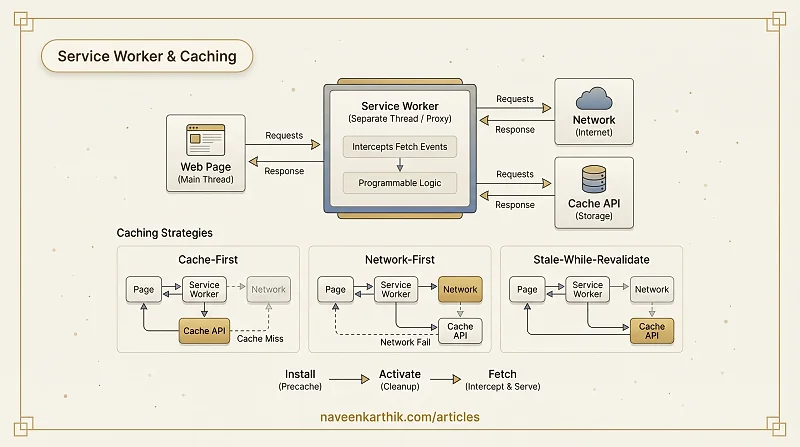
A service worker is a JavaScript file that runs in a separate thread from the page and acts as a programmable network proxy. Every request made by pages under its scope passes through it — which means you control exactly what gets cached, how it gets served, and what happens when the network is unavailable. That's a lot of power, and it comes with real complexity.
What Is a Service Worker?
A service worker is registered by a page, but it lives independently of it:
Key properties:
- Runs in its own thread — can't block the page or access the DOM
- Persists between page loads — continues running after the tab is closed (until the browser terminates it)
- Only works over HTTPS (or localhost)
- Has access to the Cache API — a key-value store for Request/Response pairs
The Service Worker Lifecycle
Deploying updates without breaking cached resources requires understanding the lifecycle. Skip it and you'll spend an afternoon debugging why users are stuck on a stale version of your app.
1. Install
Triggered when the browser downloads a new or updated sw.js. Use the install event to pre-cache the critical shell assets your app needs to render:
2. Activate
After installation, the new service worker waits until all tabs using the old worker are closed. On activation, clean up old caches so storage doesn't accumulate:
Call self.skipWaiting() in install and clients.claim() in activate if you want the new service worker to take control immediately without waiting for old tabs to close — useful for bug fixes, but be careful with breaking changes.
3. Fetch
Once active, the service worker intercepts all fetches from pages in its scope.
Caching Strategies
Different resources need different caching strategies. The choice depends on how often the resource changes and how critical freshness is.
Cache-First
Check the cache first; fetch from the network only if not cached.
Best for: versioned static assets (JS bundles, fonts, images with content hashes). These never change at a given URL, so cached content is always correct.
Network-First
Try the network; fall back to cache if the network fails.
Best for: HTML pages, API responses where freshness matters but offline fallback is valuable. Users get up-to-date content when online and a fallback when offline.
Stale-While-Revalidate
Return the cached response immediately, then fetch an update in the background for the next request.
Best for: resources that update occasionally but where returning slightly stale content is acceptable — news feeds, product listings, non-critical API data. The user always gets a fast response; the cache is kept fresh in the background.
Cache-Then-Network
Return the cached response immediately and also start a network request. When the network responds, update the UI if the response differs.
This pattern requires coordination with the page (the page listens for updates from the service worker via postMessage), making it more complex to implement. It's best suited for real-time data where you want instant display but always-fresh content.
When to Use Service Workers
Service workers are worth the complexity when:
- You need offline functionality — core features should work without a network connection
- You have frequently visited users who benefit from near-instant cache-first loads
- Your app has a reliable deploy/cache-invalidation process — versioned asset URLs, cache-busting on deploy
They add complexity and are not always the right tool. For simple static sites served from a CDN with good Cache-Control headers, HTTP caching alone is often sufficient.
Limitations and Gotchas
Debugging: Service workers intercept all requests, which can hide network errors. DevTools → Application → Service Workers shows the current registration and allows bypassing the SW for debugging.
Cache storage limits: Cache API storage is limited (varies by browser and available disk space) and can be evicted by the browser under storage pressure. Don't cache everything.
Byte-for-byte update check: The browser re-fetches sw.js on every page load and installs a new service worker if the file has changed by even one byte. Keep the service worker URL stable and version your cache names.
HTTPS only: Service workers require HTTPS in production. This is non-negotiable — a service worker with the ability to intercept all requests on an insecure connection would be a serious security risk.
Don't cache HTML with a long-lived cache-first strategy. If a user's browser caches your shell HTML forever and you push an update, they'll get stale HTML. Use network-first or stale-while-revalidate for HTML.
The biggest maintenance trap is forgetting to version your cache names when you change your precache manifest. Bump the version string in CACHE_NAME with every deploy that changes the assets list, and your activate handler will clean up the old entries automatically.
Why response.clone()? Response bodies are streams that can only be consumed once. When you cache a response AND return it to the page, you need two independent copies — one to store in the cache, one to serve. response.clone() creates that second copy. Using the original response in both places would cause one to fail silently.
Workbox: Writing service worker logic by hand is error-prone. Google's Workbox library provides production-ready implementations of all the strategies above with automatic cache versioning and precache manifest generation. Most projects should use Workbox rather than hand-rolling their own SW.