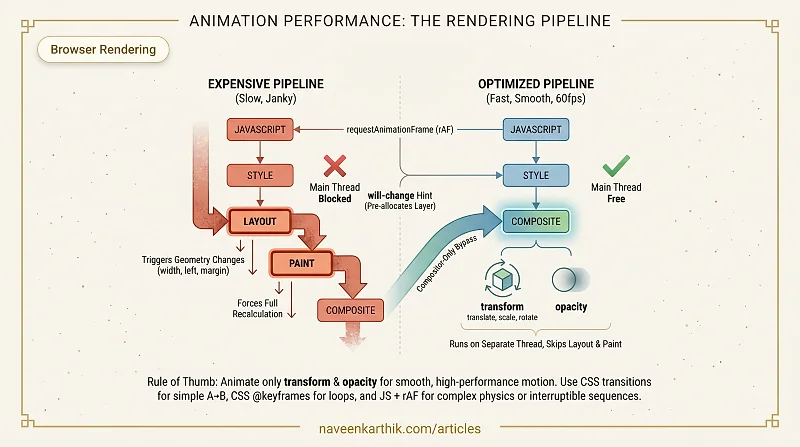
Animations are where performance becomes viscerally obvious. A janky scroll or a stuttering modal open is immediately noticed. Whether you write your animations in CSS or JavaScript determines which rendering pipeline steps they trigger — and whether they can run at 60fps without touching the main thread at all.
The Rendering Cost of Animations
Every animation that changes layout geometry — width, height, top, left, margin, padding — forces the browser through the full pipeline: layout → paint → composite. At 60fps, you have 16.67ms per frame. Layout alone can consume most of that budget.
The goal is to animate only properties that skip layout and paint entirely.
Compositor-Only Properties
Two CSS properties are handled entirely by the compositor thread, bypassing the main thread (see compositing layers):
transform— covers translation (translateX,translateY), scale, rotate, and skewopacity— fades elements in and out
Because compositing runs on its own thread, these animations remain smooth even when JavaScript is blocking the main thread with heavy work. This is the most important rule in animation performance.
The practical translation: if you're moving an element, use transform: translateX() instead of changing left. If you're showing/hiding, use opacity instead of toggling display mid-transition.
CSS Transitions vs CSS Animations vs JS Animations
CSS Transitions are the simplest tool. Triggered by a class change or pseudo-state (like :hover), they interpolate between two property values over a duration. Use transitions when you have a clear start state → end state — opening a modal, expanding a card, highlighting a button.
CSS Animations (@keyframes) give you multi-step control with timing functions per step. Use them when you need more than a simple start-to-end — looping spinners, pulsing indicators, entrance sequences with staggered stages.
JavaScript animations (via requestAnimationFrame or libraries like GSAP) run on the main thread. They are more flexible — you can respond to physics, user input mid-animation, or drive complex sequences — but they compete with JS execution for main-thread time. Use JS when you need interruptibility (the user can cancel or redirect the animation mid-flight), physics (spring, inertia, friction), or choreography (sequencing multiple elements with staggered delays).
Quick decision guide:
- Simple A→B: CSS transition
- Multi-step or looping: CSS @keyframes
- Physics, interruptibility, or complex sequencing: JS + rAF (or GSAP)
requestAnimationFrame
When you need JS-driven animation, requestAnimationFrame (rAF) is the correct tool. The browser calls your callback exactly once per frame, before paint, synchronized to the display refresh rate.
Never use setInterval or setTimeout for animation. They fire on their own schedule, independent of the browser's frame lifecycle, so you end up either updating the DOM multiple times between frames (wasted work — the extra updates are never painted) or missing frames entirely (jank). rAF fires exactly once per frame, right before paint — no wasted work, no missed frames.
The will-change Property
will-change hints to the browser that an element is about to be animated, allowing it to promote the element to its own compositor layer in advance.
This avoids a janky first frame where the browser scrambles to create the layer mid-animation. However, each promoted layer consumes GPU memory. Apply will-change only to elements that will actually animate, and remove it after the animation completes.
Blanket will-change: transform on every element is an anti-pattern that increases memory pressure without benefit.
Accessibility: prefers-reduced-motion
Some users experience motion sickness, vertigo, or seizures from animated content. The prefers-reduced-motion media query lets you respect their OS-level setting:
A duration of 0.01ms (not 0s) ensures the animation completes instantly — firing any animationend / transitionend listeners that other code might depend on. For critical motion that conveys information (like a loading spinner), consider replacing it with a static indicator instead.
Detecting Jank
Chrome DevTools' Performance panel shows frames as green bars along the timeline. Red bars or gaps are dropped frames. The Rendering tab's FPS meter shows live frame rate.
The Layers panel (DevTools → More Tools → Layers) shows every promoted compositor layer and its memory cost — useful for auditing will-change overuse.
The two-sentence version of all of this: animate transform and opacity, not geometry. When you need JS control, use requestAnimationFrame. Everything else — will-change, CSS vs JS choice, compositor layer auditing — is refinement on top of those two rules.