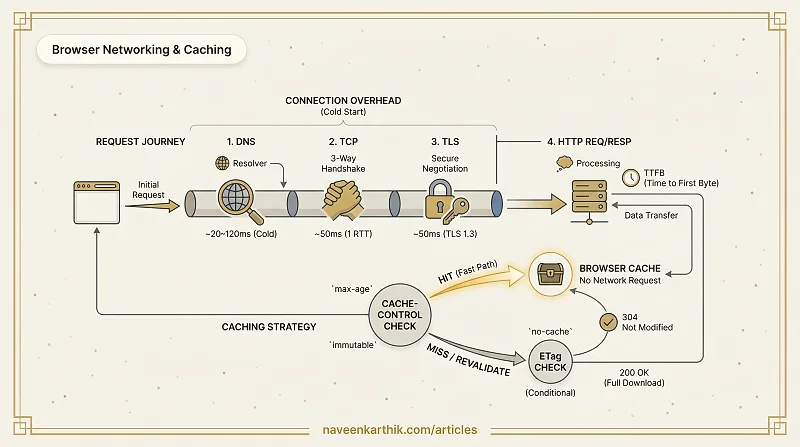
Before a single byte of your page content arrives, the browser has already spent real time on DNS, TCP, and TLS. On a cold load to a new origin, that overhead can easily add 200ms before the server even sends a response. Knowing what each stage costs — and which headers eliminate repeat costs entirely — is what separates slow sites from fast ones.
The Journey of a Network Request
When a browser needs a resource it hasn't seen before, it goes through several stages before the first byte of content arrives.
Stage 1: DNS Resolution
Before the browser can connect to api.example.com, it needs to translate that hostname into an IP address. This is DNS resolution.
The browser checks its local cache first, then the OS cache, then the configured DNS resolver (your ISP or a public resolver like 8.8.8.8). A cold DNS lookup typically adds 20–120ms to the first request to a new origin.
Optimise by using dns-prefetch to resolve hostnames for third-party origins early:
Stage 2: TCP Handshake
TCP is a reliable, ordered transport protocol. Before data can flow, the browser and server must establish a connection with a three-way handshake:
One full round trip (RTT) is consumed just to open the connection. On a 50ms RTT network, that's 50ms before a single byte of content is sent.
Use preconnect to perform the TCP (and TLS) handshake early, before the request is made:
Stage 3: TLS Handshake
For HTTPS connections (all production traffic should be HTTPS), TLS adds another 1–2 round trips on top of TCP. The browser and server negotiate cipher suites, exchange certificates, and establish encryption keys.
TLS 1.3 reduces this to a single round trip (1-RTT), and supports zero round-trip resumption (0-RTT) for repeated connections — the client caches a pre-shared key from a previous session and can send encrypted application data in the very first flight, skipping the handshake entirely. Ensure your server supports TLS 1.3; it's a free performance improvement for every HTTPS connection.
Stage 4: HTTP Request / Response
With the connection established, the browser sends the HTTP request:
The server processes the request and responds with headers followed by the body:
Time to First Byte (TTFB) measures the gap between the request being sent and the first byte of the response arriving — it captures server processing time plus one network RTT.
A high TTFB points to slow server-side processing or insufficient CDN coverage.
HTTP Caching: Cache-Control and ETag
Once a resource is downloaded, caching determines whether the browser needs to re-download it on the next visit.
Cache-Control
Cache-Control is the primary caching header. Set by the server, it controls how and how long a resource is cached.
| Directive | Meaning |
|---|---|
max-age=N | Cache for N seconds |
no-cache | Cache, but always revalidate with the server |
no-store | Do not cache at all |
immutable | Resource will never change; skip revalidation |
public | Any cache (CDN, proxy) may store it |
private | Only the browser cache (not CDN) |
ETag and Conditional Requests
When max-age expires, the browser doesn't necessarily re-download the resource. It sends a conditional request using the ETag — typically a hash of the file's content (like an MD5 or SHA checksum) generated by the server:
If the resource hasn't changed, the server responds with 304 Not Modified — no body, just confirmation. The browser uses its cached copy. This eliminates the download cost even when the cache has technically expired.
CDN and Edge Delivery
A Content Delivery Network (CDN) places servers at dozens of locations worldwide ("Points of Presence" or PoPs). When a user requests a resource, they're served from the nearest PoP rather than the origin server.
Benefits:
- Reduces latency (fewer network hops, lower RTT)
- Absorbs traffic spikes (CDN handles most requests, origin sees less load)
- TCP/TLS connections are established to the nearby PoP, not the distant origin
What to put on a CDN:
- All static assets (JS, CSS, images, fonts) — these are immutable and cache perfectly
- HTML (for pre-rendered or SSG sites) — use short TTLs with CDN-level purging on deploy
What to be careful with:
- Dynamic API responses — cache only if safe (no user-specific data)
- Use
Varyheaders correctly when caching varies by headers likeAccept-EncodingorAccept-Language.Vary: Accept-Encodingtells the CDN to store separate cached copies forbr,gzip, and uncompressed variants of the same URL — without it, a Brotli-capable browser might receive a Gzip-cached response (or vice versa).
The Full Request Timeline
Caching eliminates all of this for repeat visits. A cache hit costs nothing beyond a local lookup.
The networking stack is mostly invisible until it isn't — and when it shows up, it shows up as a slow TTFB or a 200ms delay before anything loads. Getting Cache-Control right on your static assets is the highest-leverage caching decision you can make: one deploy, and every returning user skips the network entirely for JS, CSS, and fonts. The no-cache + ETag pattern for HTML rounds that out — your users always get fresh markup without paying for a full re-download.