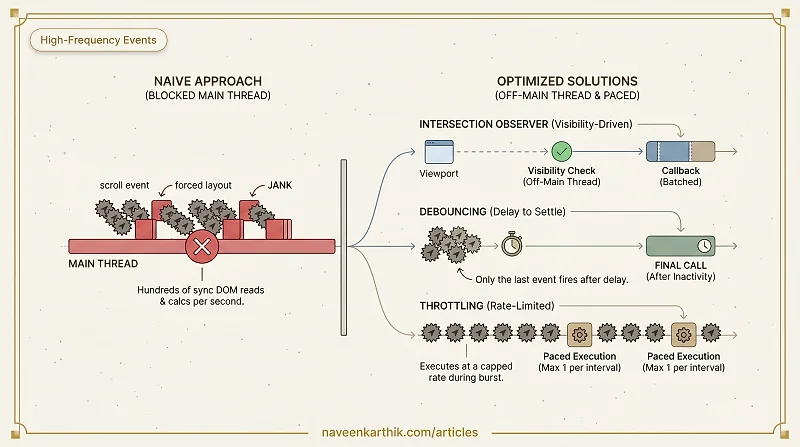
Scroll and resize events are fired dozens of times per second. If your handlers do any real work — DOM reads, API calls, visibility checks — the main thread gets hammered and the page stutters.
This article covers three tools that solve event-frequency problems at different layers: Intersection Observer for visibility, debouncing for settling events, and throttling for rate-limiting them.
The Scroll Handler Problem
The naive approach to lazy loading or scroll-triggered animations looks like this:
This fires hundreds of times per scroll. Each call reads getBoundingClientRect(), which forces the browser to compute layout synchronously. The result: jank.
The three patterns below solve this at different levels.
Intersection Observer: Visibility-Driven Logic
The Intersection Observer API lets you react to elements entering or leaving the viewport (or another element) — without polling, without scroll listeners, without forced layouts.
Options:
threshold— a value or array of values (0–1) indicating what percentage of the target must be visible to trigger the callback.rootMargin— expands or contracts the root's bounding box, like CSS margin. Positive values expand the area (e.g.,"200px"means "treat the viewport as 200px larger on all sides" — the callback fires when the element is within 200px of entering). Negative values shrink it. Useful for preloading before the element becomes visible.root— defaults to the viewport. Pass a scrollable container to observe within it.
Common use cases:
- Lazy loading images and components
- Triggering CSS animations when elements scroll into view
- Infinite scroll pagination
- Read-tracking ("has the user seen this section?")
Intersection Observer runs off the main thread and batches callbacks. It is always preferable to a scroll listener for visibility checks.
Debouncing: Delay Until Things Settle
Debouncing delays a function call until a specified period of inactivity has passed. If the event fires again before the delay expires, the timer resets.
Use it when: you only care about the final state after a burst of events.
Timeline: User types h → he → hel → hell → hello — only one fetch fires, 300ms after the last keystroke.
Typical delay values:
- Search inputs: 200–400ms
- Window resize recalculations: 150–250ms
- Form auto-save: 500–1000ms
Throttling: Enforce a Rate Limit
Throttling guarantees a function fires at most once per interval, regardless of how often the event triggers. Unlike debouncing, it executes during the event burst — just not every single time.
Use it when: you want continuous feedback during an event, but capped at a reasonable rate.
Timeline: Scroll fires 60 times/second → throttled handler fires at most ~60 times/second (but could be firing at 1000/second without it).
Typical interval values:
- Scroll position tracking: 16ms (one frame at 60fps)
- Mouse move effects: 16–32ms
- Analytics scroll-depth tracking: 100–250ms
Debounce vs Throttle: When to Use Which
| Scenario | Use |
|---|---|
| Search-as-you-type | Debounce |
| Window resize layout recalc | Debounce |
| Auto-save form draft | Debounce |
| Scroll progress indicator | Throttle |
| Drag-and-drop position update | Throttle |
| Cursor trail / parallax effect | Throttle |
| Real-time analytics sampling | Throttle |
The key question: do you want one final call after the event settles (debounce) or regular calls throughout the event burst (throttle)?
Combining Techniques
For scroll-triggered animations, the best approach often combines all three:
- Intersection Observer for visibility detection (no scroll listener needed)
- Debounce on any recalculation triggered by resize
- Throttle on anything that must track scroll position directly (progress bars, parallax)
Between these three patterns, you can cover essentially every high-frequency event scenario without touching the main thread unnecessarily. Intersection Observer for visibility, debounce for settling, throttle for pacing — pick the right tool for what you're actually trying to do.