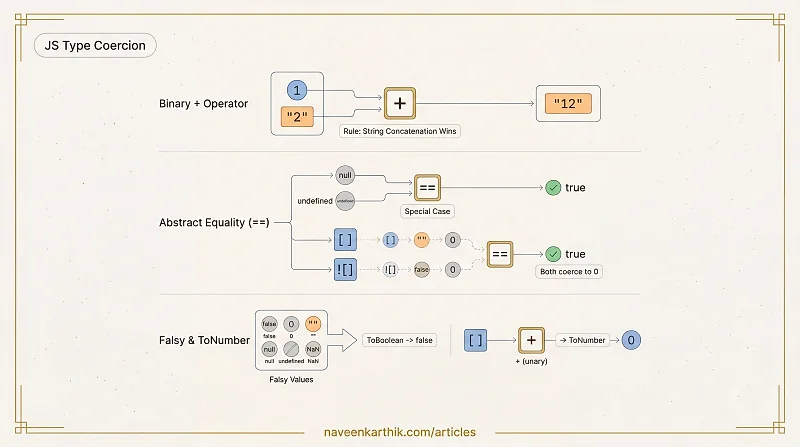
JavaScript's type coercion rules are surprisingly consistent once you know them — but they produce outputs that look wrong until you do. Ten questions covering the + operator, == abstract equality, truthy/falsy edge cases, and object-to-primitive conversion.
Q1 — String + Number
Loading editor...
Show answer
Output:
12
2
6
Why: The + operator has a special rule: if either operand is a string, it performs string concatenation instead of addition. 1 + "2" → "12". The - and * operators have no string mode — they always coerce both operands to numbers. "3" - 1 → 3 - 1 = 2. "3" * "2" → 3 * 2 = 6.
Q2 — Adding arrays
Loading editor...
Show answer
Output:
""
"[object Object]"
"[object Object]"
Why: [] coerces to "" (empty string via .toString()). {} coerces to "[object Object]". So [] + [] → "" + "" → "". [] + {} → "" + "[object Object]" → "[object Object]". The third line looks identical but if typed directly in the browser console, {} at the start of a statement is treated as an empty block, not an object — making it +[] = 0. Inside console.log() both are object literals, so the result is the same as the second line.
Q3 — == with null and undefined
Loading editor...
Show answer
Output:
true
false
false
false
Why: null == undefined is true by spec — it's a special case. null and undefined only == each other and themselves; they do not coerce to 0 or false in abstract equality comparisons. This means you can safely use x == null to check for both null and undefined simultaneously.
Q4 — [] == ![]
Loading editor...
Show answer
Output:
true
Why: ![] evaluates first: [] is truthy, so ![] is false. Now it's [] == false. false converts to 0. [] converts to "" (via .toString()), then "" converts to 0. So it's 0 == 0 → true. This is the most infamous JS coercion result — and a perfect reason to use ===.
Q5 — Unary + operator
Loading editor...
Show answer
Output:
0
NaN
3
1
0
NaN
Why: Unary + converts the operand to a number. +[] → +"" → 0. +{} → +"[object Object]" → NaN (not a valid number string). +"3" → 3. +true → 1. +null → 0. +undefined → NaN. These coercions happen via the ToNumber abstract operation.
Q6 — Falsy values
Loading editor...
Show answer
Output:
false is falsy
0 is falsy
 is falsy
null is falsy
undefined is falsy
NaN is falsy
Why: There are exactly six falsy values in JavaScript: false, 0, "" (empty string), null, undefined, and NaN. Everything else — including "0", [], {}, and 0n (BigInt zero is falsy too) — is truthy. Notably: "0", [], and {} are all truthy even though they might seem "empty".
Q7 — == with objects
Loading editor...
Show answer
Output:
true
false
Why: When == compares an object with a number, the object is converted to a primitive via ToPrimitive — which calls valueOf() first. a.valueOf() returns 1, so a == 1 becomes 1 == 1 → true. But a == b is an object-to-object comparison — == only returns true for the same reference, never by value. Since a and b are different objects, a == b is false.
Q8 — typeof edge cases
Loading editor...
Show answer
Output:
object
undefined
number
function
object
Why: typeof null returning "object" is a historical bug in JavaScript — null is not an object. typeof NaN returns "number" — NaN stands for "Not a Number" but is typed as a number. typeof function(){} is "function" (a special case — functions are objects but get their own type string). typeof [] is "object" — arrays are objects; use Array.isArray() to distinguish them.
Q9 — String comparison (lexicographic)
Loading editor...
Show answer
Output:
false
true
true
Why: When both operands of > are strings, JavaScript compares them lexicographically (character by character). "1" has a lower char code than "9", so "10" > "9" is false. When at least one operand is a number, both are coerced to numbers: "10" → 10, and 10 > 9 is true.
Q10 — Template literal coercion
Loading editor...
Show answer
Output:
null
undefined
[object Object]
1,2,3
Why: Template literals call String() on each interpolated value (via ToString abstract operation). String(null) → "null". String(undefined) → "undefined" (unlike + undefined which gives NaN). String({}) → "[object Object]". String([1,2,3]) → "1,2,3" (via .join(",")).
Key Rules
| Operation | Rule |
|---|---|
+ (binary) | If either side is a string → concatenate. Otherwise → add numbers. |
-, *, / | Always coerce both sides to numbers. |
== | Coerces types (see spec table). Use === to avoid surprises. |
null == undefined | true. null/undefined don't == anything else. |
!x | Converts to boolean, then negates. |
+x (unary) | Converts to number via ToNumber. |
typeof null | "object" — a historical bug. |
| Template literals | Calls String() on values — null and undefined become their string names. |
Go Deeper
- JS Foundations #5 — Equality & Type Coercion — the full abstract equality algorithm with spec walk-through
- Output Quiz #4 — this Binding & Arrow Functions — the previous quiz
- Output Quiz #6 — Promises & async/await Ordering — the next quiz