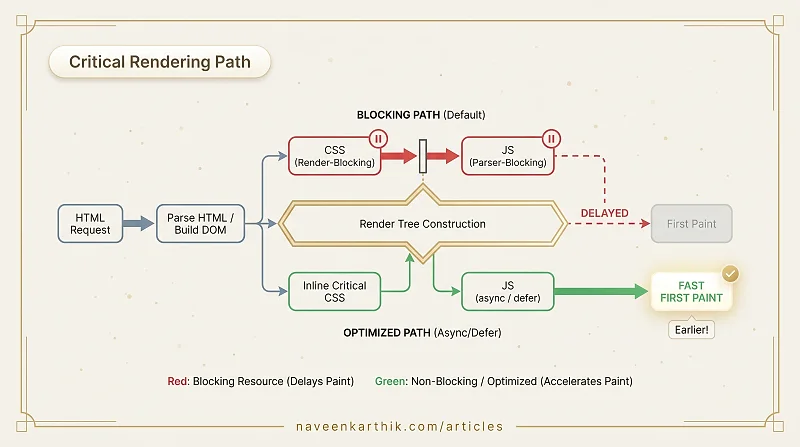
Page load speed often comes down to one question: how much work does the browser have to finish before it can show the user anything? That sequence of work is the Critical Rendering Path (CRP) — fetch HTML, parse it, fetch and parse all blocking stylesheets, execute blocking scripts, build the render tree, run layout, paint. Everything on that list is a potential bottleneck.
The shorter and lighter this path, the faster the first paint. Almost every technique used to improve perceived load speed — inlining CSS, deferring scripts, eliminating render-blocking resources — is aimed at shortening the CRP.
What Makes a Resource "Render-Blocking"?
A resource is render-blocking when the browser must download and process it before it can produce any pixels. Two resource types are render-blocking by default:
- CSS — always render-blocking, because the browser won't paint without a complete CSSOM.
- JavaScript (without
asyncordefer) — parser-blocking, because a<script>tag in the<head>stops HTML parsing until the script is fetched and executed.
Images, fonts, and other assets are not render-blocking. They affect completeness, but not first paint.
Why CSS Blocks Rendering
When the browser encounters a <link rel="stylesheet">, it:
- Dispatches a fetch request for the stylesheet.
- Pauses rendering until the stylesheet is fully downloaded and parsed.
The reason: rendering a partially-styled page would produce visible flashes as styles arrive. The browser prefers to wait.
This means every kilobyte in your CSS is on the critical path. Unused selectors, large framework bundles, and slow stylesheet servers all delay first paint.
Other options: minimise stylesheet size, remove unused rules, split by route.
Why JavaScript Blocks the Parser
When the parser encounters a <script> tag (without async or defer), it:
- Stops parsing HTML.
- Fetches the script (if external).
- Executes it.
- Resumes parsing.
JavaScript can manipulate the DOM and CSSOM, so the parser cannot safely continue without executing the script first. A slow script in <head> blocks the entire page.
There's an additional subtlety: JavaScript also blocks on CSS. Before executing a script, the browser ensures all preceding stylesheets are parsed. A script placed after a stylesheet is therefore blocked by both:
1. Browser encounters <link rel="stylesheet" href="styles.css">
2. Parser keeps building the DOM (CSS doesn't block the parser)
3. Parser encounters <script src="app.js" defer></script>
4. Script is fetched, but CANNOT execute yet — it's waiting on styles.css
5. styles.css finally downloads and is parsed into the CSSOM
6. Now the script executes (because defer waits for full DOM)
7. The parsed DOM + CSSOM are ready → render tree → layout → paint
This is why a slow stylesheet in <head> can delay everything even when scripts are deferred: every script queued behind it is waiting too. The fix is simple — keep blocking stylesheets as small as possible, and place non-critical styles after scripts so they don't gate execution.
async and defer: Breaking the Block
Two attributes change how scripts interact with the parser:
async
- Fetched in parallel with HTML parsing.
- Executed immediately when downloaded — pauses parsing at that moment.
- Order is not guaranteed across multiple async scripts.
- Best for: independent third-party scripts (analytics, ads).
defer
- Fetched in parallel with HTML parsing.
- Executed only after the HTML is fully parsed, just before
DOMContentLoaded. - Order is preserved across multiple deferred scripts.
- Best for: all first-party application scripts.
For most application code, defer is the right default. type="module" scripts are deferred by default.
Preload Scanner
While the main parser is blocked by a script, the browser runs a secondary "preload scanner" that looks ahead in the HTML for resources to fetch. This is why placing scripts at the bottom of <body> still allows stylesheets and images to begin downloading early — the preload scanner already discovered them.
The preload scanner cannot discover resources injected by JavaScript. Dynamically created <link> or <script> tags are invisible to it until they actually execute.
Measuring the CRP
Chrome DevTools → Network tab → Waterfall view shows which resources are on the critical path. A waterfall is a visual timeline where each row represents one resource (HTML, CSS, JS, image, font) and each horizontal bar shows when the resource was requested, how long it took to download, and whether it blocked anything behind it. Look for:
- Resources at the top of the waterfall that block everything below them.
- Long blue bars (HTML transfer) with stylesheets queued behind them.
- Scripts before the first green line (DOM content loaded).
The Lighthouse audit "Eliminate render-blocking resources" identifies exactly which files are on your critical path and estimates how much time removing them would save.
To find which CSS rules are actually used on a page (and which are dead weight on your critical path), open DevTools → Coverage tab (Cmd/Ctrl+Shift+P → "Show Coverage"), reload the page, and inspect the red bars in your CSS files. Red = unused bytes that delayed first paint for no reason. Lighthouse's "Reduce unused CSS" audit does the same analysis programmatically.
The CRP ends at first paint, not at onload. Once pixels are on screen, the critical path is complete — even if images are still loading, fonts haven't arrived, and JavaScript hasn't hydrated the page. The CRP is about getting something visible as fast as possible. Everything after first paint is progressive enhancement.
CRP Optimisation Checklist
| Action | Impact |
|---|---|
Add defer to all app <script> tags | Removes parser blocking |
| Inline above-the-fold CSS | Eliminates stylesheet round-trip |
| Load non-critical CSS asynchronously | Unblocks rendering |
| Reduce stylesheet size | Less to parse before first paint |
Use preconnect for critical third parties | Removes DNS/TCP overhead |
| Minimise render-blocking third-party scripts | High impact, often overlooked |
The CRP is a useful mental model because it makes the cost of every resource explicit — it's either on the critical path or it isn't. Once you start thinking in those terms, the usual Lighthouse recommendations stop feeling like a checklist and start making intuitive sense.