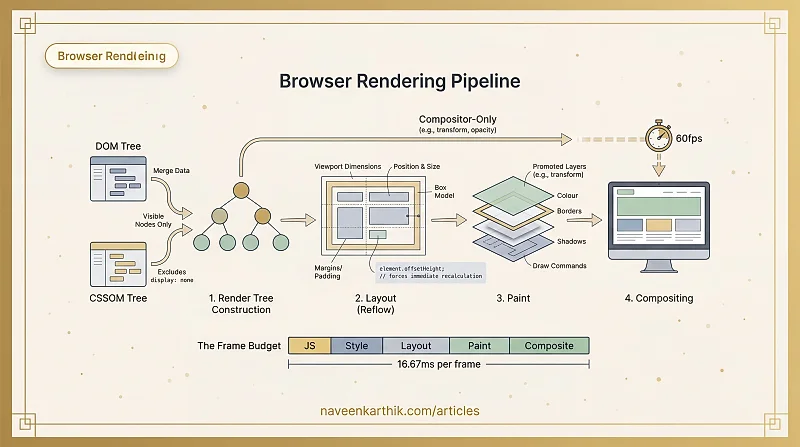
Rendering is the process of converting the browser's internal data structures — the DOM and CSSOM — into actual pixels on screen. It's everything that happens after parsing and before you see the page.
In the browser rendering pipeline, rendering covers steps 3 through 6: building the Render Tree, calculating Layout, Painting, and Compositing.
The Four Rendering Steps
1. Render Tree Construction
The browser merges the DOM and CSSOM into the Render Tree — a new tree containing only the nodes that will actually be visible. Elements with display: none are excluded entirely. Pseudo-elements like ::before are included even though they're not in the DOM.
The Render Tree is the first structure that truly represents what the user will see.
2. Layout (Reflow)
Given the render tree and the viewport dimensions, the browser calculates the exact position and size of every visible element — its x/y coordinates, width, height, margins, and padding. This step produces the box model for every node.
Layout is expensive. Changing anything that affects geometry — width, height, font-size, or document structure — triggers a re-layout of every element downstream.
3. Paint
Layout tells the browser where things go. Paint fills them in — it converts each element's visual properties (colour, borders, backgrounds, shadows, text) into actual draw commands.
Modern browsers split paint into compositing layers. Elements promoted to their own layer (via transform, will-change, or opacity) are painted independently.
4. Compositing
The final step takes all painted layers and composites them into the single image you see on screen, respecting z-index and stacking order. This runs on the compositor thread, separate from the main thread.
This separation is what makes transform and opacity animations special — they bypass layout and paint entirely, running on the compositor at 60fps even while the main thread is busy.
Rendering vs Parsing
These two phases are often confused, but they're distinct:
| Parsing | Rendering | |
|---|---|---|
| Input | Raw text (HTML, CSS) | DOM + CSSOM |
| Output | DOM tree, CSSOM tree | Pixels on screen |
| Steps | Tokenize → build trees | Render tree → layout → paint → composite |
| Blocked by | Scripts (parser-blocking) | Stylesheets (render-blocking) |
Parsing produces the data. Rendering produces the visuals. Both are on the Critical Rendering Path.
Render-Blocking vs Parser-Blocking
A resource is render-blocking when the browser must process it before producing any pixels. CSS is render-blocking — the browser won't paint without a complete CSSOM.
A resource is parser-blocking when it stops the HTML parser from advancing. A synchronous <script> is parser-blocking — the parser halts until the script is fetched and executed.
CSS is render-blocking but not parser-blocking — the DOM can continue building while CSS downloads. Scripts are parser-blocking (unless defer or async), and they also wait for preceding CSS before executing.
The Frame Budget
At 60 frames per second, the browser has 16.67ms per frame to run layout, paint, compositing, and any JavaScript. Miss that budget and the user sees a dropped frame — "jank."
┌──────────────────────────────────────────────┐
│               16.67ms frame budget           │
├────────┬───────┬───────┬────────┬────────────┤
│   JS   │ Style │Layout │ Paint  │ Composite  │
└────────┴───────┴───────┴────────┴────────────┘
Performance work is largely about keeping rendering fast:
- Avoid layout thrashing — batch DOM reads and writes instead of interleaving them (reflow & repaint)
- Stay on the compositor — use
transformandopacityfor animations - Reduce paint complexity — fewer layers, simpler backgrounds, smaller repaint areas
Re-rendering
The initial render is just the first pass. Every time something changes — a user scrolls, JavaScript modifies a style, an element is added or removed — the browser must re-render. But it doesn't always re-run every step:
- Compositor-only change (transform, opacity) → skips layout and paint
- Paint-only change (colour, background, shadow) → skips layout
- Layout change (width, height, font-size) → runs the full pipeline
Knowing which properties trigger which steps is the foundation of animation performance. The fewer steps triggered, the cheaper the frame.
Why Rendering Matters
Every rendering step competes for the same 16.67ms frame budget. Blocking the rendering pipeline means delayed First Contentful Paint, dropped frames during interaction, and poor Core Web Vitals scores.
The rendering pipeline is the model. Once you understand it, the reasoning behind performance advice — defer scripts, inline critical CSS, animate with transform — becomes obvious. It's all about keeping this pipeline fast and unblocked.