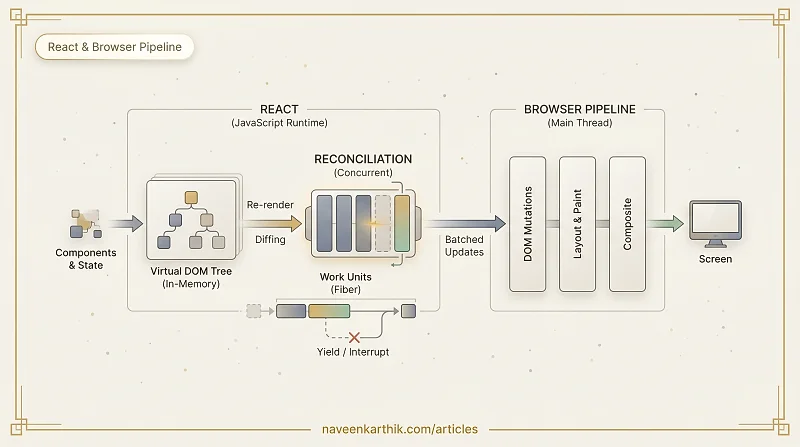
When you use React, you're not bypassing the browser's rendering pipeline — you're working within it. React's entire design is shaped by the six steps the browser runs on every frame: parse, style, render tree, layout, paint, composite. Understanding where React sits inside that sequence explains why it works the way it does.
If you haven't read How the Browser Renders a Page yet, that's the foundation this builds on.
The Problem React Is Solving
Every DOM change is expensive. Touching the DOM — adding a node, changing a class, updating text — can trigger layout recalculation, repaint, or both. In a complex UI where dozens of things update in response to a single user action, naively updating the DOM for each change would hammer the browser's layout engine.
React's answer is to batch DOM work: collect all the changes, figure out the minimum set of actual DOM mutations needed, then apply them in one go.
The Virtual DOM
React maintains an in-memory copy of the DOM called the Virtual DOM (vDOM). It's a plain JavaScript object tree — cheap to create, cheap to traverse, cheap to throw away.
When your component returns JSX, React doesn't touch the real DOM. It builds or updates the vDOM tree instead.
This tree lives entirely in JavaScript — it never touches Steps 3–6 of the browser pipeline until React decides to flush changes.
Reconciliation: Finding the Diff
When state or props change, React re-runs the component function to get a new vDOM tree, then diffs the new tree against the previous one. This process is called reconciliation.
React's diffing algorithm makes two assumptions to keep it O(n) instead of O(n³):
- Elements of different types produce completely different trees — React tears down and rebuilds rather than patching.
- The
keyprop is used to identify which list items are the same across renders.
The output of reconciliation is a list of DOM mutations — the minimum changes needed to bring the real DOM in sync. React then applies these in a single batch, which is one layout pass, one repaint.
Where React Runs in the Pipeline
React's reconciler runs on the main thread, inside the JavaScript execution slot of the browser's frame loop. It's not magic — it competes for the same 16.67ms budget as everything else.
Browser Frame
│
├── [Input events / rAF callbacks]
├── [JavaScript — React reconciler runs here]
│     ├── Re-run component functions → new vDOM
│     ├── Diff new vDOM vs old vDOM
│     └── Apply minimal DOM mutations
├── [Style recalculation]
├── [Layout]
├── [Paint]
└── [Composite]
This is why a React app can still jank. If reconciliation takes 80ms (a large tree, expensive render functions), the frame misses its deadline and the user sees a dropped frame. The vDOM isn't free — it just costs less than touching the real DOM on every update.
State Batching: One Update, One Re-render
React batches multiple state updates within the same event handler into a single re-render, which means a single layout pass.
React 18 extended batching to cover setTimeout, Promise callbacks, and native event handlers — contexts where React 17 would flush each update separately.
React 18: Concurrent Rendering
React 18 introduced concurrent rendering — the ability to pause, resume, and abandon renders in progress. This is the biggest architectural change since React's original release.
The Problem It Solves
In React 17, once reconciliation started, it ran to completion. A large re-render on a slow device could block the main thread for 200ms — no input handling, no animation, no scroll.
How Concurrent Mode Works
React 18 breaks reconciliation into small units of work ("fibers") and checks after each unit whether the browser needs the main thread back. If a higher-priority task arrives (user input, an animation frame), React yields, lets the browser handle it, then resumes the render.
startTransition marks the results update as interruptible. While it's in progress, the input stays responsive. If the user types again before the results finish rendering, React throws the in-progress render away and starts fresh with the new query.
React Server Components
React Server Components (RSC) move component rendering to the server before the HTML is sent to the browser. The server sends a serialized component tree; the client hydrates it without re-running the component logic.
From the browser pipeline's perspective, RSC shifts work out of the JavaScript execution slot entirely for the initial load — the browser receives HTML and a compact payload describing the UI, rather than a JavaScript bundle that must run to produce HTML.
Practical Takeaways
| Situation | What's happening in the pipeline | Fix |
|---|---|---|
| Large list re-renders slowly | Reconciliation takes too long, blocks main thread | Virtualize the list (react-window) or use React.memo |
| Input lags during a heavy state update | Main thread is busy reconciling | Wrap the heavy update in startTransition |
| Animation stutters after a state change | Layout/paint triggered by DOM mutations during animation | Move animation to CSS transform; keep state updates separate |
| Full page re-render on every keystroke | Too many components re-rendering | React.memo, useMemo, stable references with useCallback |
React is a layer on top of the browser pipeline, not a replacement for it. Every virtual DOM flush eventually becomes a real DOM mutation, which the browser must still process through layout, paint, and composite. React's job is to make those flushes as small and infrequent as possible — and with concurrent rendering, to make sure the work never blocks the thread for long enough to hurt the user.